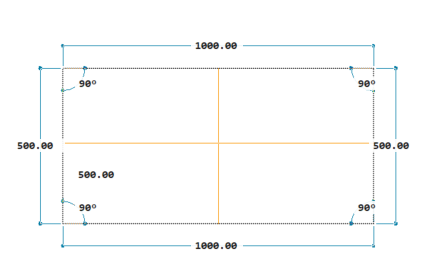
Measures the distance, radius, angle, area, and volume for the selected entities, for a sequence of points, or dynamically by hovering over entities.
Icon:
Method
Choose an option to take a measurement.
The measurement result is displayed in the Command line.
Options within the command
Distance
Measures the distance between two selected points.
Multiple points
Allows you to select multiple points to draw a virtual polyline and measure its total length.
Arc
Adds the length of the arc drawn between two points to the total distance.
The arc can also be defined using the options for creating an ARC entity.
Angle
Sets the angle of the arc segment from the start point. A positive number creates counterclockwise and a negative number creates clockwise arc segments.
CEnter
Sets the center of the arc.
Length of chord
Specifies the chord length of the arc segment. If the previous segment is an arc, the new arc segment is drawn tangent to the previous arc segment.
Direction
Sets the direction of the second point of the arc.
Radius
Sets the radius for the arc.
Second point
Specifies the second point and endpoint of a three-point arc.
Line
Adds the length of a line drawn between last point and the next selected one.
Length
Sets the length of a segment to be added to the total.
Close
Automatically adds to the total the distance between the last point and the first one.
Undo
Removes the most recent arc segment added to the polyline.
Total
Displays the total length of the drawn entities.
Radius
Measures the radius of an arc or circle.
Angle
Measures the angle of the selected arc, circle, polyline segments, and line objects.
Specify vertex
Allows you to specify a point that acts as the vertex and two other points to measure the angle created by each side of the vertex.
ARea
Measures the area and perimeter of a defined area.
find area of one Entity
Measures the area and perimeter of a selected entity.
Add areas together
Adds another area to the total area.
Subtract areas
Subtracts an area from the total area.
Volume
Measures the volume of a defined area or of the selected entity.
find volume of one Entity
Measures the volume of a selected entity.
Add volumes together
Adds another volume to the total volume.
Subtract volumes
Subtracts a volume from the total volume.
Quick
Dynamically displays dimensions, distances, and angles as you hover over and between entities, allowing you to check the drawing easily. Also, it displays the area and perimeter in the Command line while clicking inside a closed entity.
Mode
Sets the quick mode as default.
Yes
The Quick option is the default one.
Note: The setting is retained after restarting BricsCAD.