
SMREPAIR command
Restores the 3D solid model of a sheet metal part.

Icon: 
Description
The SMREPAIR command restores the 3D solid model of a sheet metal part through one of the following scenarios:
- Repair by thickening one of the sides.Note: SMREPAIR restores the 3D solid model of a sheet metal part by thickening one of its sides. All thickness faces become perpendicular to the flange faces.
- Repair of lofted bend features.Note: Fixes problems specific to parts with lofted bend features. It merges adjacent bends and provides tangential connections with flanges.
- Repair by converting bends.Note: Converts incorrect bends to regular bends. If a single, incorrect bend is selected, it will be repaired. If a 3D solid is selected, then all incorrect bends will be converted to regular bends.
Method
Launch the command to open the Sheet Metal Health command context panel to view all sheet metal features with issues in the drawing.
- Select a flange face or lofted bend face to repair the sheet metal part when global repair is toggled.
- Select a flange, an incorrect bend face, a thickness face, or a side edge to repair the sheet metal part when local repair is toggled.
Note: The Sheet Metal Health command context panel provides a visual support for the SMREPAIR command by displaying detected issues and offering feedback on repairs.
Options within the command context panel
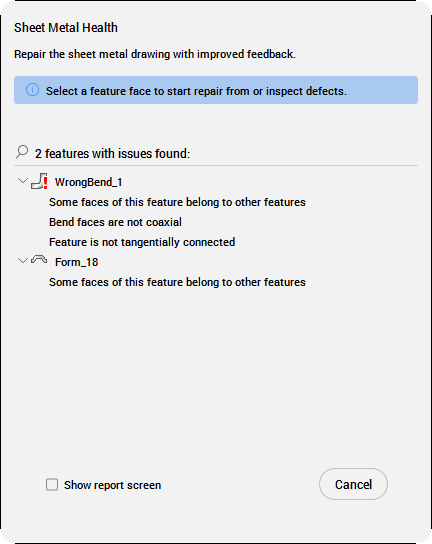
- Features with issues found
- Lists all features with issues in the drawing. Select a feature in the panel to highlight it in the drawing, or right-click on it to open the context menu.
- Zoom to defects
- Zooms to the selected feature in the drawing.
Tip: Click the arrow next to the feature name to expand the list of found issues.
- Show report screen
- When checked, opens the Heal report section of the Sheet Metal Health command context panel after repairing.
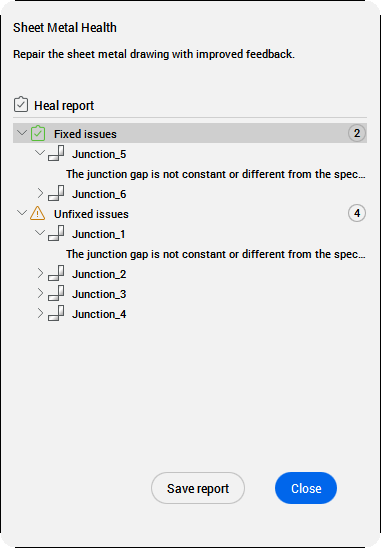
- Heal report
- Lists the conclusions after running the SMREPAIR command, placing them in categories such as Fixed issues, Unfixed issues or New issues.
Click the arrow next to the feature name to expand the list of issues.
- Save report
- Opens the Save SMHEALTH Report dialog box to save the report as TXT file.
Options within the command line
- switch on Local repairing
- Repairs one selected flange face, lofted bend face, thickness face, side edge, or form feature with invalid transforms. A body with thickness faces perpendicular to the selected face and without adjacent lofted bends is created.Note: The size and position of the opening on the selected face is preserved and the size and position of the opening on the opposite face is adjusted.
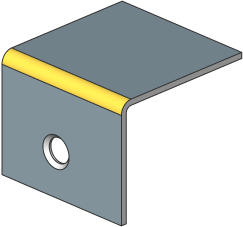
Before (flange face is selected) After 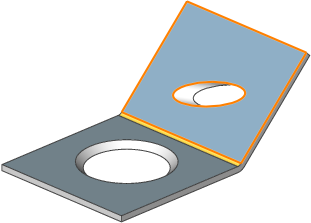
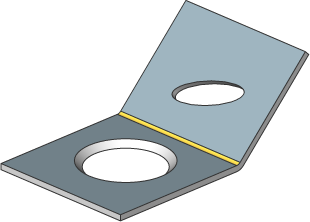
Before (incorrect bend face is selected) After 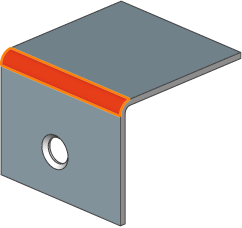
- switch on Global repairing
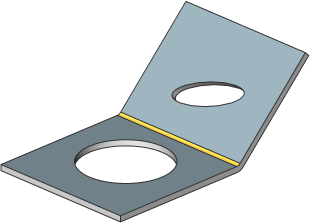
- Repairs all the incorrect flange faces, lofted bend faces, thickness faces or side edges from the selected solid. A body with thickness faces perpendicular to the selected face and without adjacent lofted bends is created.Note: The size and position of the opening on the selected face is preserved and the size and position of the opening on the opposite face is adjusted.
Before After 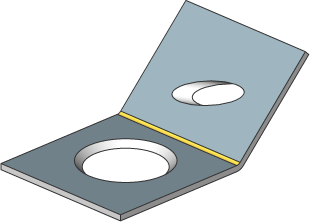
- Scan for lost details
- Searches and retains model parts that remain as separated bodies after repair.Note: The scan tolerance is a fraction of the initial model volume. This fraction is ignored and only larger bodies are retained. For example, if the scan tolerance = 0.25, only parts with a volume that is larger than 25% of the initial body are retained.
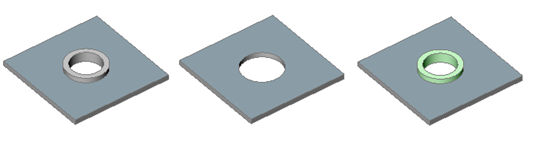
From left to right:
- Initial model with an unrecognized form feature.
- Model after SMREPAIR without scanning for lost details: the circular feature is removed.
- Model after SMREPAIR with scanning for lost details. Two bodies are created: a horizontal flange with a hole and a separate body (highlighted in green color). The bodies can be unified with the UNION command if required.
- Finish command
- Finishes the command and closes the Sheet Metal Health command context panel.
- save Report to file
- Opens the Save SMHEALTH Report dialog box to save the report as TXT file.