
Feature Control Frame dialog box
Opens via: AMFCFRAME command
The Feature Control Frame dialog box defines the symbol characteristics, their tolerance values, and the letter identifying the datum relative to which the tolerance is specified. Also, it is possible to add notes.
The parameters entered for the feature control frame will be stored temporarily and used as default values for the next feature control frame symbol.
The most recent revision of the standard to which this symbol conforms is displayed at the top of the dialog box.
The dialog box contains two main tabs, Symbol and Leader and text.
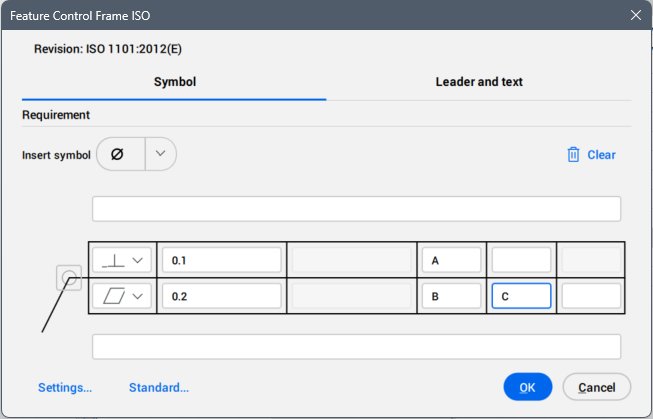
Symbol
Specifies the feature control frame requirements. The drafting standard, ISO, DIN, ANSI or JIS is written in the Revision field.
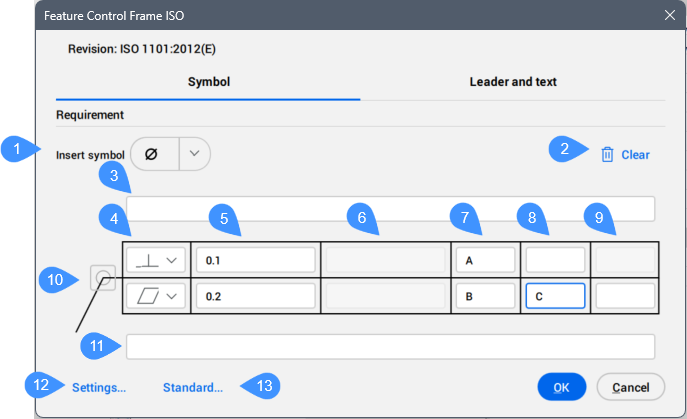
- Insert symbol
- Clear
- Top Note
- Geometric symbol
- Tolerance 1
- Tolerance 2
- Datum 1
- Datum 2
- Datum 3
- All around
- Bottom Note
- Settings...
- Standard...
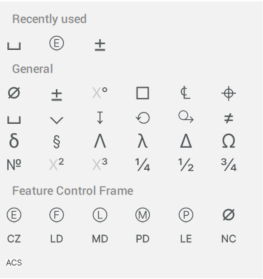
- Insert symbol
- Inserts a symbol from the drop-down list into the selected parameter field.
-
- Clear
- Clears the last inserted parameters. The cells become empty.
- Top Note
- Inserts a note to add above the symbol.
- Geometric Symbol
- Allows you to choose a geometric symbol from the drop-down list.
- Tolerance 1
- Allows you to type in the tolerance to appear next to the geometric symbol.
- Tolerance 2
- Allows you to type in the tolerance to appear next to the geometric symbol.
- Datum 1/2/3
- Allows you to type in additional letters identifying the datum relative to which the tolerance is specified.Note: The second and third fields will become available for writing only after the previous one is filled in.
- All around
- Toggles the visibility of the all around symbol.
- Bottom Note
- Inserts a note to add below the symbol.
- Settings...
- Opens the Feature Control Frame Settings dialog box. See the Feature Control Frame Settings dialog box article for more information.
- Standard...
- Opens the Standard Settings dialog box. See the Standard Settings dialog box article for more information.
Leader and text
Specifies the Leader and text properties.
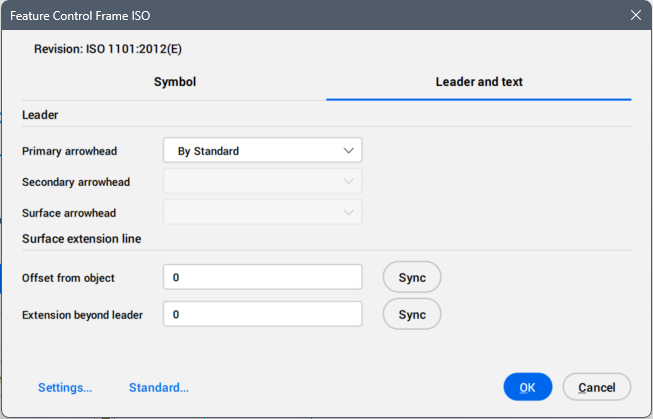
- Leader
- Sets the leader properties.
- Primary arrowhead
- Defines the default primary leader arrowhead type from the drop-down list.
- Secondary arrowhead
- Defines the default secondary leader arrowhead type from the drop-down list.
- Surface arrowhead
- Defines the arrowhead for surface indication leaders. Note: This option is only available for the standards which allow surface indicator leaders.
- Surface extension line
- Sets the surface extension line properties.
- Offset from object
- Defines the distance between the start point of the extension line and the attached object.
- Extension beyond leader
- Defines the distance between the symbol’s start point and the surface extension line’s end point.