
SORGENTIDATISEZIONE
Gestisce le origini dati all'interno di un gruppo di linee di sezione.

Metodo
Specificare il nome del gruppo di linee di sezione o accettare il nome del gruppo di linee di sezione predefinito.
Viene visualizzata la finestra di dialogo Gestisci origine dati.
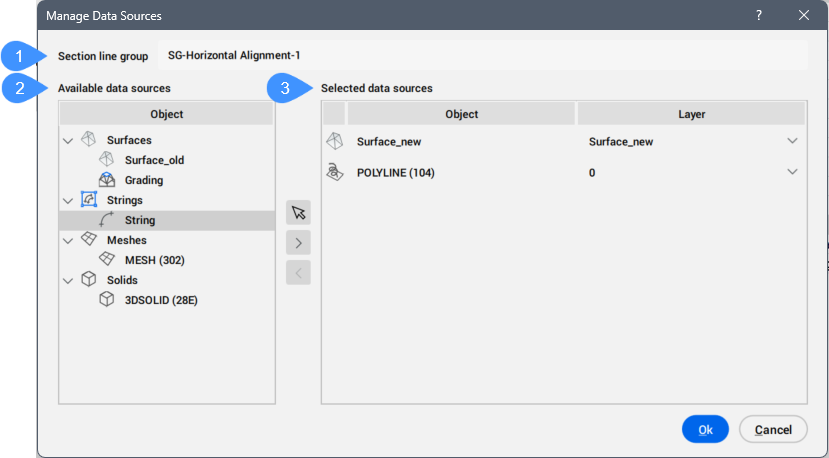
- Gruppo di linee di sezione
- Sorgenti dati disponibili
- Sorgenti dati selezionate
Gruppo di linee di sezione
Visualizza il nome del gruppo di linee di sezione.
Sorgenti dati disponibili
Elenca tutte le sorgenti dati disponibili nel disegno.
Le sorgenti dati selezionate possono essere aggiunte all'elenco Sorgenti dati selezionate premendo il pulsante  .
.
Sorgenti dati selezionate
Elenca le sorgenti dati selezionate incluse nel gruppo di linee di sezione.
Le sorgenti dati selezionate possono essere rimosse dall'elenco Sorgenti dati selezionate premendo il pulsante  .
.
Inoltre, è possibile selezionare le entità civili dal disegno, premendo il pulsante  .
.