
OBJECTSCALE [異尺度対応オブジェクトの尺度]
尺度係数を追加または削除します。

アイコン:
説明
注釈尺度係数ダイアログボックスで、異尺度対応図形に使用する尺度係数を追加または削除します。
注: 異尺度対応尺度は、文字やハッチングパターンなどの異尺度対応図形の尺度係数を印刷尺度に合わせて調整します。
注釈図形の尺度ダイアログボックスでは、注釈図形で使用する尺度係数を追加または削除できます。
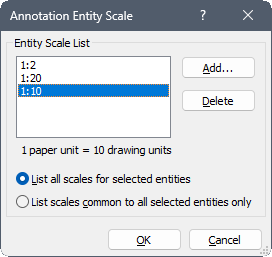
図形尺度一覧
選択した注釈図形がサポートする、すべての尺度を表示します。
- 追加
- 選択した図形に注釈尺度係数を追加します。
- 削除
- 選択した注釈図形から、注釈尺度を削除します。注: このオプションは、図形に複数の注釈尺度が添付されている場合に利用可能です。
オプション
- 選択図形のすべての尺度の一覧
- 選択された図形で共有されているすべての尺度係数を一覧表示します。
- すべての選択図形の共通の尺度だけを一覧表示
- 選択された図形で共有されている尺度係数のみを一覧表示します。注: 少なくとも2つの図形を選択する必要があります。