
標高解析
以下より開きます:
- 選択したTINまたはTIN土量サーフェス図形の場合 >土木エクスプローラパネル >表示スタイルタブ > TIN解析セクション >標高解析フィールド > 右側の3つのドットをクリック
- 選択したTINまたはTIN土量サーフェス図形の場合 >プロパティパネル > TIN解析セクション >標高フィールド > ドロップダウンリスト > 編集...オプション
標高解析ダイアログボックスでは、TINサーフェス標高解析を行うためのパラメータを定義できます。
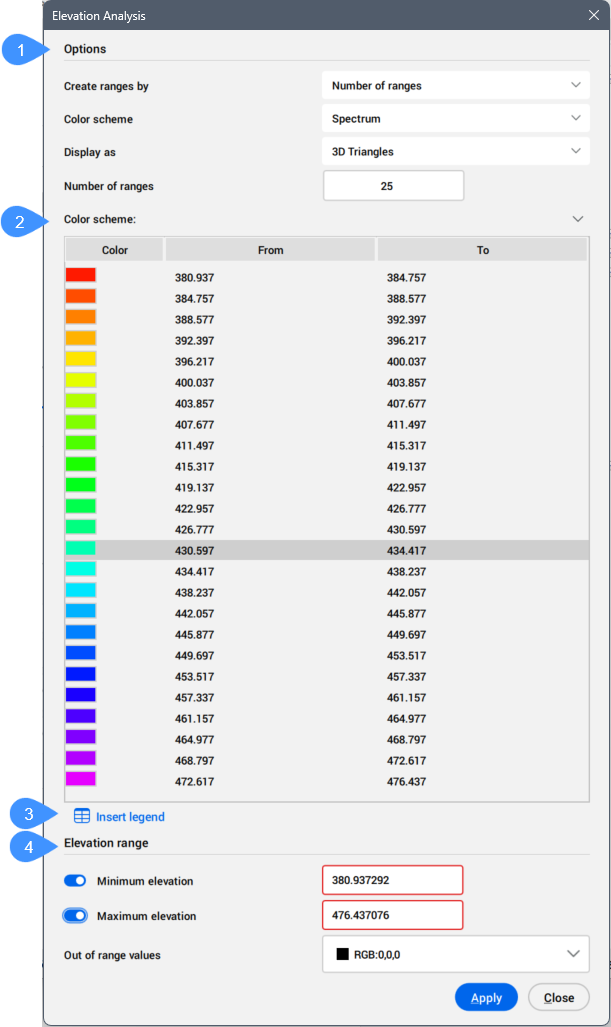
- オプション
- カラースキーム
- 凡例を挿入
- 標高範囲
オプション
TINサーフェス標高解析を行うためのパラメータを指定できます。
- 範囲の作成方法
- 標高解析の作成方法を選択します。
- 範囲数: 指定した数の標高範囲でTINサーフェスに色を適用し、割り当てた色で各範囲が表示されます。
- 範囲間隔: 指定した基本標高と範囲間隔に従って標高範囲に色を適用します。デフォルトでは、基本標高はTINサーフェスの最も低い箇所に設定されますが、異なる基本標高値を指定することもできます。
- データムによる範囲間隔: 指定した基本標高とデータムに従って標高範囲に色を適用します。データムより上と下の標高範囲に別々のカラースキームを選択できます。
重要: 範囲の作成方法に応じて、使用可能なプロパティが異なります。
- カラースキーム
- 標高解析の配色を選択します。
使用可能なオプションから選択します。
- スペクトラム
- 地表
- 水理
- グレー
- レッド
- グリーン
- ブルー
- カスタム
- データカラースキーム上側
- データムより上のカラースキームを選択できます。
- データカラースキーム下側
- データムより下のカラースキームを選択できます。
- 表示形態
- 標高解析の作成に使用するTINサーフェス要素を選択します。
使用可能なオプションから選択します。
- 3D三角形
- 3D輪郭
- 点
- 2D三角形
- 2D等高線
注: TINサーフェス上の三角形を非表示にすると、標高解析が見やすくなります。
- データム
- データム標高を指定します。
- 基本標高
- TINサーフェスを間隔ごとに色分けするための開始標高を指定します。標高範囲は、範囲間隔値を基本標高に追加することによって計算されます。
- 範囲数
- TINサーフェスに色を適用するために使用される標高範囲の数を指定します。カラースキームセクションで、個々のバンドの標高範囲と色を変更することができます。
- 範囲間隔
- 標高解析の範囲間隔を指定します。
カラースキーム
選択したカラースキームに基づいて標高範囲に対応する色を表示します。
注: 範囲数オプションを使用して範囲を作成すると、テーブル内の標高値を編集することができます。
凡例を挿入
図面内の指定した位置にカラースキームテーブルを挿入します。
標高範囲
指定した標高範囲と色に従ってTINサーフェスに色を適用する最小標高と最大標高を定義します。最小標高より下の値と最大標高より上の値には、範囲外の値セクションで選択した色が適用されます。
- 最小高さ
- アクティブにすると、最小標高値を指定できます。この値より下のTINサーフェス上の標高は、範囲外の値セクションで定義されている別の色で表示されます。
- 最高高さ
- アクティブにすると、最大標高値を指定できます。この値より上のTINサーフェス上の標高は、範囲外の値セクションで定義されている別の色で表示されます。
- 範囲外の値
- 定義した範囲から外れている値を持つ標高の色表現を定義できます。