
Add item dialog box
Opens via: Customize dialog box
Depending on the selected item within the Customize dialog box, the Add item dialog box opens as Add menu item, Add tool, Add ribbon dialog launcher, Add ribbon toggle button, Add ribbon command button, Add keyboard shortcut, Add button item or Add quad button dialog box. The available options are identical for each dialog box.
The Add item dialog box allows you to add an item by selecting an available tool or by creating a new tool.
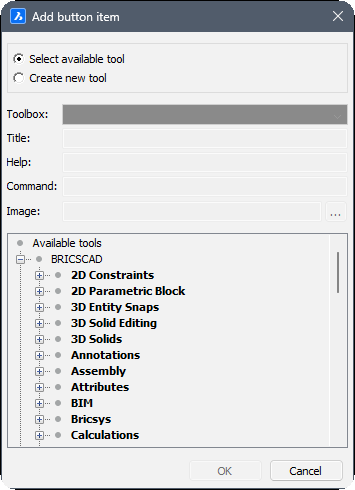
Select available tool
Assigns an existing command to the new button or button group. If this option is selected, the other options are grayed out, except for Available tools.
Create new tool
Assigns a new command/macro to the new button or button group. If this option is selected, Available tools is grayed out.
Toolbox
Specifies the toolbox to which to add the new command. You can choose a toolbox in the drop-down list.
Title
Specifies the name of the new tool.
Help
Specifies the help string displayed on the status bar.
Command
Specifies the command(s) or macros.
Image
Specifies the image to display for the new tool. The browse icon opens the Tool Image dialog box. There are five options to select an image.
Available tools
Selects an existing tool.