
Export To GIS dialog box
Opens via: GISEXPORT command
The Export To GIS dialog box controls which GIS entities are exported and in which file format.
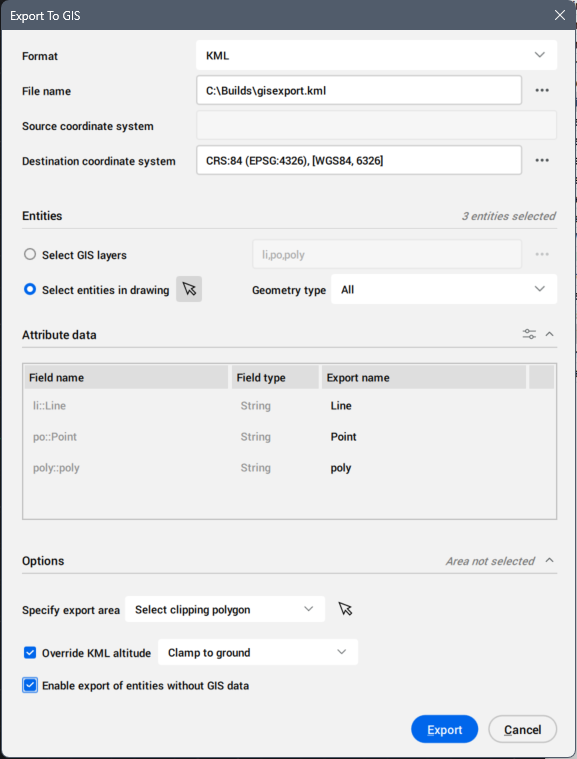
Format
Selects from the drop-down list the export file format for the GIS entities: ESRI SHP, GML and KML.
File name
Click the browse button ( ) to open the Export As dialog box and indicate the file name.
Source coordinate system
Displays the coordinate system used in the current drawing.
Destination coordinate system
Selects the target coordinate system for export. Click the browse button () to open the Choose GIS Coordinate System dialog box.
Entities
Selects the entities to export.
- Select GIS layer
- Selects the GIS layers to export.
Click the browse button (
) to open the Select GIS layers dialog box.
- Select entities in drawing
- Selects the entities in the drawing.
Attribute data
Selects the GIS attributes to be included in the export.
- Manage attributes... button
- Opens the Manage attributes dialog box.
- Attributes list
- Lists the attributes selected for export.
- Field name
- Displays the field name.
- Field type
- Displays the field type.
- Export name
- Displays the export name. Click the Export name field to edit the default name of the attribute.
- Delete
- Click the trash button (
 ) to remove the selected attribute.
Note: An empty state component displays when the selected entities in the drawing do not contain any GIS attribute data.
Options
Sets the GIS export options.
- Specify export area
- Defines the export area from the drop-down list.
- Export all
- Uses the entire drawing as export area.
- Select clipping polygon
- Click the mouse icon
 to select a polygon in the drawing that defines the export area.
- Draw clipping polygon
- Click the mouse icon to draw a polygon that defines the export area.
- Override KML altitude
- Selects how the altitude of the entity is interpreted as terrain elevation in Google Earth when exporting to KML.
- Clamp to ground
- Ignores the altitude of the entity specification and only uses the terrain elevation at the location.
- Relative to ground
- Interprets the altitude of the entity as relative to the terrain elevation at the location, adding the altitude value to the terrain elevation.
- Absolute
- Interprets the altitude of the entity as relative to sea level, using this value for terrain elevation.
- Enable export of entities without GIS data
- Sets to export the entities without GIS data.