
LAYOUTKONVERTIEREN Befehl (Experimentell)
Konvertiert ein Layout mit nicht unterstützten Ansichten in ein unterstütztes Format.

Haftungsausschluss

Die Konvertierung inkompatibler Layouts ist ein experimentelles Feature, das möglicherweise noch nicht stabil ist und in Zukunft entfernt werden könnte. Verwenden Sie den Befehl VERWALTENEXPERIMENTELLERFEATURES, um experimentelle Features zu aktivieren oder zu deaktivieren.
Der Experimenteller Modus ist standardmäßig deaktiviert. Aktivieren oder Deaktivieren der Experimenteller Modus erfordert einen Neustart von BricsCAD.
Beschreibung
Erstellt ein neues Layout basierend auf dem angegebenen Layout und ersetzt die nicht unterstützten Ansichten durch kompatible Versionen. Das ursprüngliche Layout behält seine Kompatibilität mit anderer DWG-Software.
Methode
Geben Sie den Namen eines vorhandenen Layouts an, das konvertiert werden soll.
Wenn Sie eine Zeichnung öffnen, die ein Layout mit inkompatiblen Ansichten enthält, wird ein Warndialog angezeigt.
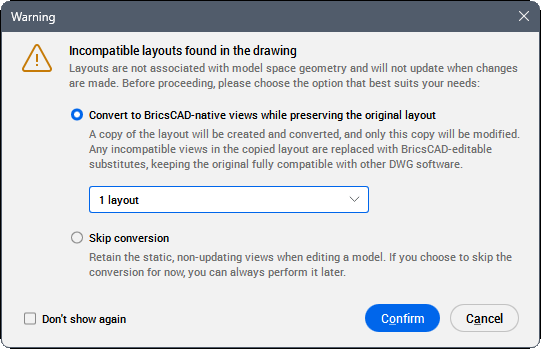
- Konvertierung in BricsCAD native Ansichten unter Beibehaltung des ursprünglichen Layouts
- Erstellt und konvertiert eine Kopie des Layouts. Wählen Sie aus der Dropdown-Liste die Layouts aus, die konvertiert werden sollen.
- Konvertierung überspringen
- Es werden keine Layouts konvertiert.
- Dies nicht mehr anzeigen
- Verhindert, dass der Warndialog in zukünftigen Sitzungen angezeigt wird. Diese Option kann mithilfe der Systemvariablen LAYOUTCONVERSION geändert werden.