
Edit your profile
- Log into Bricsys 24/7.
- Click the profile icon/picture on the right side of the project bar.
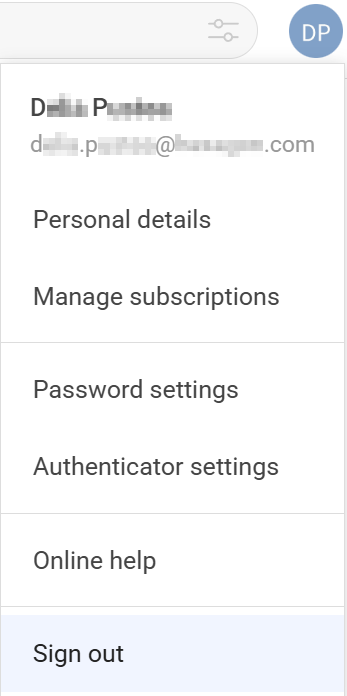
- Personal details
- Opens the DETAILS tab to edit your personal settings:
- Profile picture
- Name
- Security settingsNote: A new instance opens to change the security settings.
- Language
- Address
- Contact details
Note: An invitee or existing user must contact their admin if they want to change their email address.Click the Save changes button. A message confirms the changes are recorded.
- Manage subscriptions
- Opens the SUBSCRIPTIONS tab to change your subscriptions:
- Subscribe to a Daily Overview.
A daily notification email informs you about updates.
- Subscribe to a Daily Task Overview.
A daily notification email informs you about open tasks.
- Enable or disable workflow task notifications.
A notification email informs you about workflow tasks.
- Check the Folder subscriptions overview.Note:
- Navigate to the specific folder details to subscribe.
- Folder subscriptions are only available if you are logged into a project.
Click the Save changes button. A message confirms the changes are recorded.
- Subscribe to a Daily Overview.
Go to the PERSONAL SETTINGS tab to:
- Enable or disable Add revision to document name on download.
Click the Save changes button. A message confirms the changes are recorded.
- Password settings
- Allows you to set up a new password.
Click to open a new browser tab, Update Password.
Fill in the fields and click Submit. A re-authentication page opens.
Enter the new password and click Log in. You are now logged into your account with the new password.
- Authenticator settings
- Allows you to set up Multi Factor Authentication (MFA).
Click to open a new browser tab, Authenticator.
Follow the instructions, fill in the fields, and click Save. The MFA is set.
- Online help
- Opens the main page of the Bricsys 24/7 Help Center website.
- Sign out
- Signs out from your 24/7 account.