
TINEXTRACT command
Extracts meshes, solids, points, faces, contours, borders or intersection lines from TIN surfaces, Gradings, or Volume Surfaces.

Icon: 
Description
Opens the Extract from dialog box to choose which entity you want to extract from a TIN surface, a Grading, or Volume Surface.
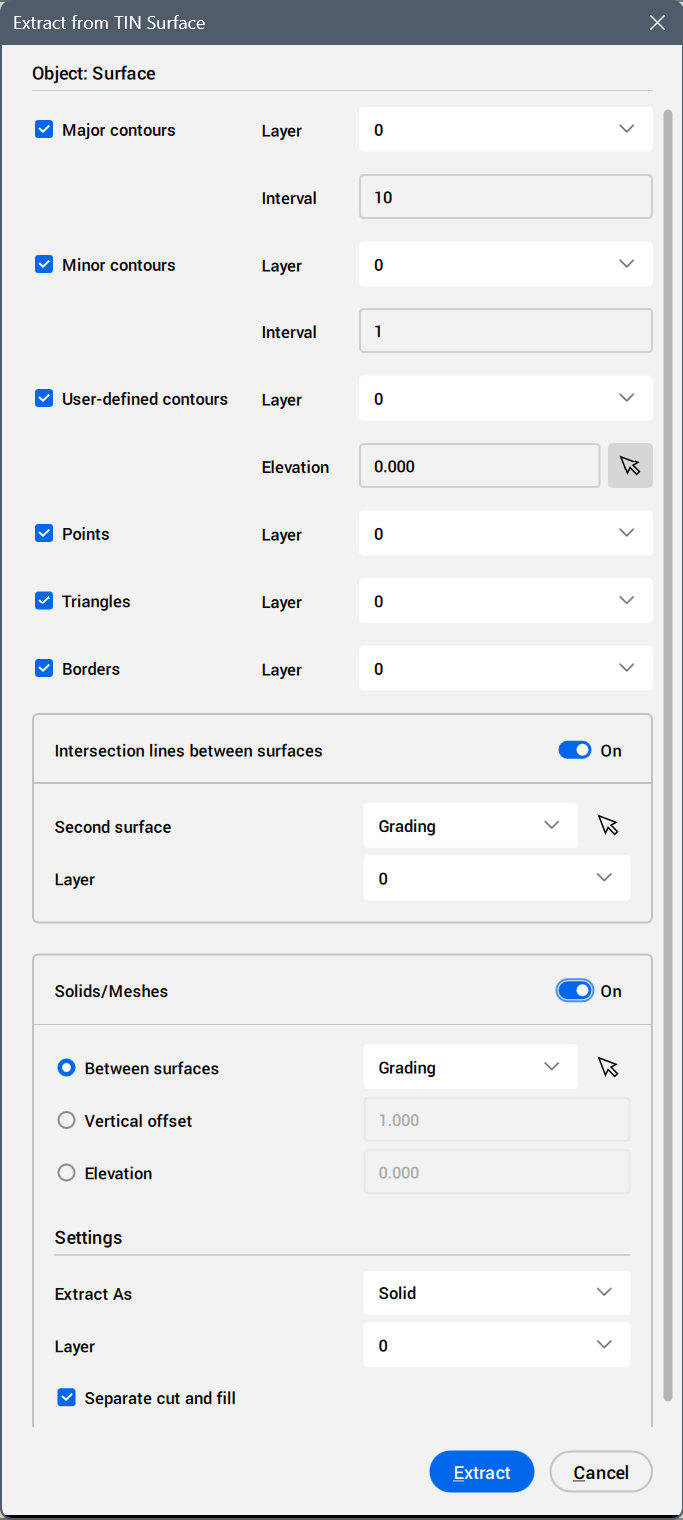
Major contours
Extracts the contours of a TIN surface, Grading, or TIN Volume Surface for an elevation according to major contours interval set.
- Layer
- Sets the layer for the extracted major contours.
- Interval
- Defines the major contours interval.
Minor contours
Extracts the contours of a TIN surface, Grading, or TIN Volume Surface for an elevation according to minor contours interval set.
- Layer
- Sets the layer for the extracted minor contours.
- Interval
- Defines the minor contours interval.
User-defined contours
Extracts an user-defined contour.
- Layer
- Sets the layer for the extracted user-defined contours.
- Elevation
- Defines the elevation value.Note: To set the elevation from the drawing area, click the Pick contour button.
Points
Extracts all points on the surface.
- Layer
- Sets the layer for the extracted points.
Triangles
Extracts all triangular faces of the surface.
- Layer
- Sets the layer for the extracted triangular faces.
Borders
Extracts the outer boundary of the surface.
- Layer
- Sets the layer for the extracted outer boundary.