
Communicator for BricsCAD - Supported import file formats
Supported import file formats
Starting with BricsCAD V27, Communicator for BricsCAD file formats are available for import without requiring a separate Communicator for BricsCAD license. The available format support depends on the active BricsCAD license level.
- BricsCAD Pro and BricsCAD BIM include STEP and IGES formats.
- BricsCAD Mechanical and BricsCAD Ultimate include all the Communicator for BricsCAD file formats.
Note: Communicator for BricsCAD must be installed to access the formats available for your BricsCAD license level.
Windows
- ACIS: .asab, .asat, .sab, .sat
- Autodesk Inventor: .iam, .ipt
- CATIA V4: .model, .exp and .session
- CATIA V5: .CATDrawing, .CATPart, .CATProduct, .CGR
- Creo Elements / Pro Engineer: .asm, .prt
- IGES: .iges, .igs
- NX: .prt
- Parasolid: .xmt_bin, .xmt_txt, .x_b, .x_t
- Siemens JT: .jt
- SolidWorks: .sldasm, .sldprt
- STEP: .step, .stp, .stpz
- VDA-FS: .vda
- XCGM: .xcgm
- Solid Edge: .asm, .par, .psm
- STL: .stl
Linux
- ACIS: .asab, .asat, .sab, .sat
- Autodesk Inventor: .iam, .ipt
- CATIA V4: .model, .exp and .session
- CATIA V5: .CATDrawing, .CATPart, .CATProduct, .CGR
- Creo Elements / Pro Engineer: .asm, .prt
- IGES: .iges, .igs
- Parasolid:.xmt_bin, .xmt_txt, .x_b, .x_t
- Siemens: .jt
- Solid Edge: .asm, .par, .psm
- SolidWorks: .sldasm, .sldprt
- STEP: .step, .stp, .stpz
- VDA-FS: .vda
- XCGM: .xcgm
- STL: .stl
Mac
- ACIS: .asab, .asat, .sab, .sat
- CATIA v4: .model, .exp and .session
- Creo Elements / Pro Engineer: .asm, .prt
- IGES: .iges, .igs
- Parasolid: .xmt_bin, .xmt_txt, .x_b, .x_t
- STEP: .step, .stp
- VDA-FS: .vda
Note: Depending on the Communicator settings:
- You can import an assembly file as plain geometry (a non-hierarchical set of entities) or map its product structure to native blocks or mechanical components, depending on the IMPORTPRODUCTSTRUCTURE system variable setting.
- You can define color conversion on import by setting the IMPORTCOLORS system variable.
- PMI (Product and Manufacturing Information) is supported for the following file formats: ACIS, CATIA V5, NX, Pro/E or Creo, SolidWorks, XCGM. When IMPORTPMI system variable is On, PMI annotations are imported as graphical elements grouped in blocks.
- If the assembly contains hidden parts, you can decide how to represent them in BricsCAD: import and hide, import and set visible or just do not import. This feature is currently supported only for CATIA V5 and is controlled by the IMPORTHIDDENPARTS system variable.
- You can set import options to automatically repair, stitch and simplify imported geometry, by setting the IMPORTSTITCH, IMPORTREPAIR and IMPORTSIMPLIFY system variables.
The IGES format also has its own options to stitch and simplify (IMPORTIGESSTITCH and IMPORTIGESSIMPLIFY system variables).
- If you import a 3D model from SolidWorks® or STEP, you can map the Y axis to the Z axis by setting the IMPORTSOLIDWORKSROTATEYZ and IMPORTSTEPROTATEYZ system variables, because the vertical axis in SolidWorks® is Y.
- For Creo, Inventor, NX, Solid Edge, and SolidWorks® it is possible to specify an alternate search path (IMPORTCREOALTERNATESEARCHPATHS, IMPORTINVENTORALTERNATESEARCHPATHS, IMPORTNXALTERNATESEARCHPATHS, IMPORTSOLIDEDGEALTERNATESEARCHPATHS, and IMPORTSOLIDWORKSALTERNATESEARCHPATHS system variables). This will be used to look for parts absent in the imported assembly folder.
- For Creo, NX, and SolidWorks®, you can specify the configuration to import (IMPORTCREOCONFIGURATION, IMPORTNXCONFIGURATION, IMPORTSOLIDWORKSCONFIGURATION system variables).
- For CATIA V5, Inventor, NX, Solid Edge, and SolidWorks® it is possible to define priority order of search paths (IMPORTCATIAV5SEARCHPATHSPREFERENCE, IMPORTINVENTORSEARCHPATHSPREFERENCE, IMPORTNXSEARCHPATHSPREFERENCE, IMPORTSOLIDEDGESEARCHPATHSPREFERENCE, and IMPORTSOLIDWORKSSEARCHPATHSPREFERENCE system variables).
- When COMMUNICATORBACKGROUNDMODE system variable is On, the Import/Export file is performed in the background. You can continue working on your CAD documents while Communicator for BricsCAD imports/exports your file.
When a file is imported, geometric entities are inserted into the document after you click the filename hyperlink in the notification bubble. This action switches to the document, regenerates the viewport, and zooms to extents.
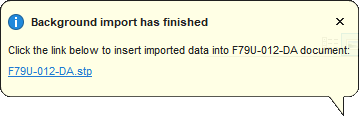
Closing the notification bubble cancels the import session and deletes the memory allocated by the background import.
- For CATIA V5, JT, and SolidWorks® format files the user can define which data representation should be imported by setting the IMPORTCATIAV5REPRESENTATION, IMPORTJTREPRESENTATION, and IMPORTSOLIDWORKSREPRESENTATION system variables.
- For CATIA V5 the user can define which edge attributes should be read during import by choosing an option for IMPORTCATIAV5EDGEATTRIBUTES system variable.