
Customize (Tool Palettes) dialog box
Opens via: Tool Palettes panel
The Customize (Tool Palettes) dialog box allows you to customize the tabs and tools to use in the Tool Palettes panel.
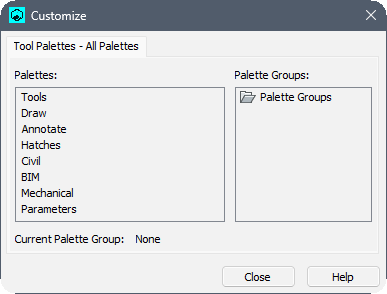
Palettes
Displays a list of all palettes available in the tool palettes panel. By right clicking on one of the palettes, several options may be available in the context menu.
- Rename
- Renames the Palette by entering the new name.
- New Palette
- Adds a new palette to the list.
- Delete
- Deletes the selected palette.
- Export
- Opens the Export Palette dialog box to export the selected palettes as XTP files.
- Import
- Opens the Import Palette dialog box to import palettes.Note: Supported file formats are XTP, BTC and ATC.
Palette Groups
Displays the loaded palette groups. Right click a group to open a context menu with additional options.
- New group
-
Adds a new sub-group to the list.
- Set current
- Sets the selected group as current.
- Export
- Opens the Export Palette Group dialog box to export the selected palettes as XPG files.
- Import
- Opens the Import Palette Group dialog box to import palettes.Note: Supported file formats are XPG and BWS.