
Datum Identifier dialog box
Opens via: AMDATUMID command
The Datum Identifier dialog box defines all parameters for the datum identifier symbol.
The parameters entered for the datum identifier symbol will be stored temporarily and used as default values for the next datum identifier setting.
The most recent revision of the standard to which this symbol conforms is displayed at the top of the dialog box.
The dialog box contains 2 main tabs, Symbol and Leader and text.
Symbol
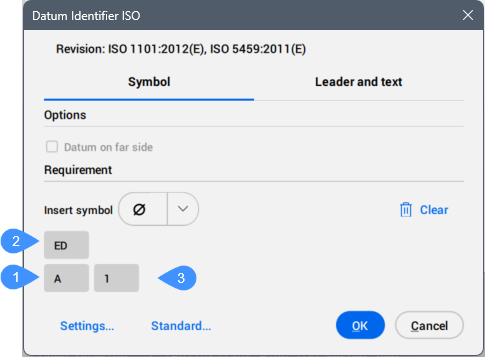
- Options
- Toggles the datum type.
- Requirement
- Sets the properties of the datum identifier.
-
- Insert symbol
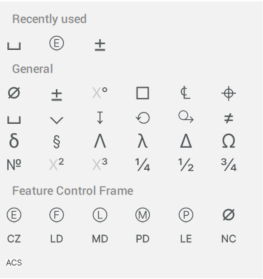
- Inserts a symbol from the drop-down list into the selected parameter field.
-
- Clear
- Clears the last inserted parameters. The cells become empty.
- Identifier (1)
- Defines the identifier, which can contain a maximum of two characters that is automatically assigned in alphabetical order, starting with A, followed by B, C, and so on. After reaching Z, the sequence continues with AA, AB, AC, etc. If an identifier is deleted, the AMDATUMID command will attempt to fill the gap starting from the top of the alphabetical list. For example, if identifiers A, B, and C are in use and B is deleted, the next time an identifier is needed, it will reuse B to fill that gap.
- Thread note (2)
- Defines the thread notes, which are placed on symbols attached to gears or screw threads. They specify which diameter to use as the datum.
- Datum note (3)
- Defines the reference datum targets which correspond to points on a surface. Generally, it contains a series of datum targets separated by commas (",").
Note: Thread and datum notes are not available for all standards.
- Settings...
- Opens the Datum Identifier Settings dialog box. See the Datum Identifier Settings dialog box article for more information.
- Standard...
- Opens the Standard Settings dialog box. See the Standard Settings dialog box article for more information.
Leader and text
Specifies the Leader and text characteristics.
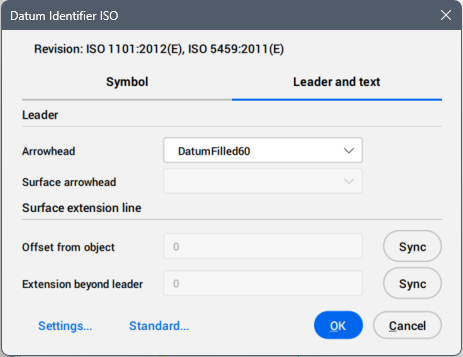
- Leader
- Sets the leader characteristics.
- Arrowhead
- Sets the default leader arrowhead type.
- Surface arrowhead
- Sets the arrowhead for surface indication leaders. Note: This option is only available for the standards which allow surface indicator leaders.
- Surface extension line
- Sets the surface extension line characteristics.
- Offset from object
- Sets the offset from the object.
- Extension beyond leader
- Sets the extension beyond leader.