
Drawing Explorer Options dialog box
Opens via: Drawing Explorer dialog box
The Drawing Explorer Options dialog box aligns or sets the scale and the rotation of the inserted blocks.
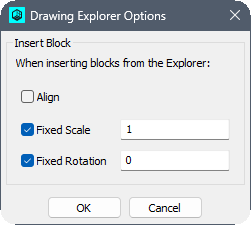
Align
Aligns the block with selected entities.
Fixed Scale
Inserts the block at a fixed scale. Tick the checkbox to specify the scale factor.
Fixed Rotation
Inserts the block at a fixed rotation angle. Tick the checkbox to specify the angle.