
View Detail dialog box
Opens via: Details panel > click a detail thumbnail
The View Detail dialog box displays information about the selected BIM detail.
For advanced (propagatable) details
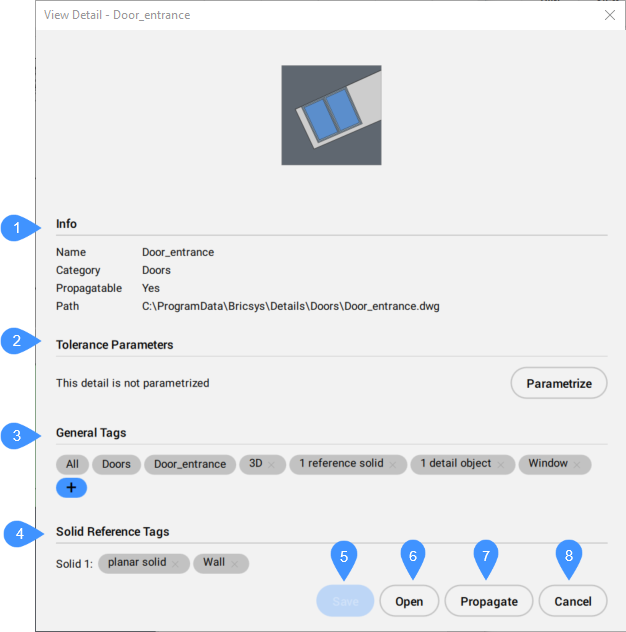
- Info
- Tolerance Parameters
- General Tags
- Solid Reference Tags
- Save
- Open
- Propagate
- Cancel
- Info
- Displays general information about the detail.
- Name
- Displays the name of the detail. This is added to the General tags list.
- Category
- Displays the category name of the detail. This is added to the General tags list.
- Propagatable
- Specifies if the detail can be propagated.
- Path
- Displays the path of the detail file.
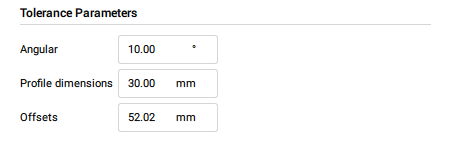
- Tolerance Parameters
- Displays the parameters of the detail, or the option to parametrize the detail.
- Parametrize
- Opens the detail's DWG file and executes the BIMPARAMETRIZEDETAIL command.Note: If the detail is already parametrized, this option is turned off, and the parameters are displayed.
- General Tags
- Displays the tags that generally identify the detail.
- To delete tags, click the X button next to the tag's name.
- To add a user defined tag, click the blue plus button. The tag is displayed in orange.
- Solid Reference Tags
- Displays the tags that identify an individual solid reference from the detail. These are system defined tags.Note: Solid reference tags are automatically generated for the detail during its creation process (BIMCREATEDETAIL command). You can only delete system defined tags from a solid reference.
- To delete tags, click the X button next to the tag's name.
- Save
- Saves the changes and closes the View Detail dialog box.
- Open
- Opens the DWG file of the detail.
- Propagate
-
Propagates the detail. See the BIMPROPAGATE command article.
- Cancel
- Closes the View Detail dialog box without saving the changes.
For basic details
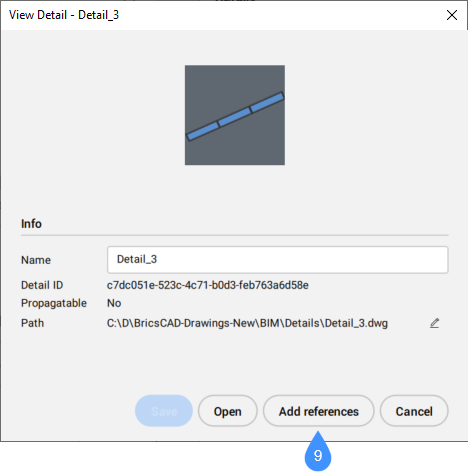
9. Add references
- Add references
- Launches the BIMADDDETAILREFS command.