
Welding Settings dialog box
Opens via: Weld Symbol dialog box > Settings... button
The Welding Settings dialog box defines the leader and text properties for all weld symbols in the drawing, overriding those set in the Standard Settings dialog box.
Note: The default text, leader and symbol properties for all symbol annotations are defined in the Standard Settings dialog box.
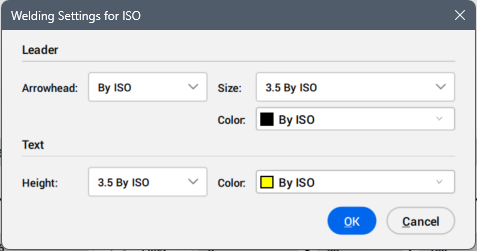
Leader
Defines the leader properties for the weld symbol.
- Arrowhead
- Sets the leader arrowhead type for the weld symbol from the drop-down list.
- Size
- Sets the leader size for the weld symbol from the drop-down list.
- Color
- Sets the leader color for the weld symbol from the drop-down list.
Text
Defines the text properties for the weld symbol.
- Height
- Sets the text height for the weld symbol from the drop-down list.
- Color
- Sets the text color for the weld symbol from the drop-down list.