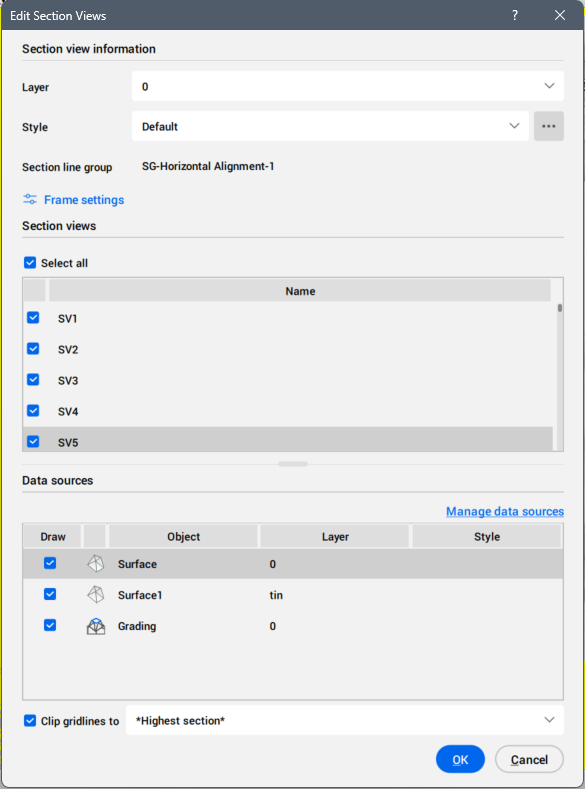
Edit Section Views dialog box

Opens via: SECTIONVIEWEDIT command

The Edit Section Views dialog box allows you to edit section views.

Note: When is selected only one section view, the name of the dialog box is Edit Section View.

Section view information

Allows you to set the layer and style for the section views.

Layer
Sets the layer for section view by selecting it from the drop-down list.
Style
Sets the style for section views by selecting it from the drop-down list.

Press the three-dot button on the right to open the Select Style dialog box, where you can edit or copy a section view style.

Section line group

Displays the section line group name.

Frame settings

Opens the Frame Settings dialog box to set the width and the height of the frames.

Section view(s)

Lists the selected section view or all section views created along the section line group.

Select all
Selects all section views.
Note: This button appears only when multiple section views are available.

Data sources

Lists the selected data sources for the current section line group.

You can deselect data sources that you want to be removed from the section views.

Also, for some data sources you can change the style.

Manage data sources button
Opens the Manage Data Sources dialog box.

Clip gridlines to

When ticked, it allows you to set the clip gridlines from the drop-down list.