
ALIGNMENTVERTICALMANAGE command
Manages the vertical alignments.

Icon: 
Method
The Select Alignment dialog box opens to select a horizontal alignment.
Note: When a horizontal alignment is already selected in the drawing, the Select Alignment dialog box does not open.
Then, the Manage Vertical Alignments dialog box opens.
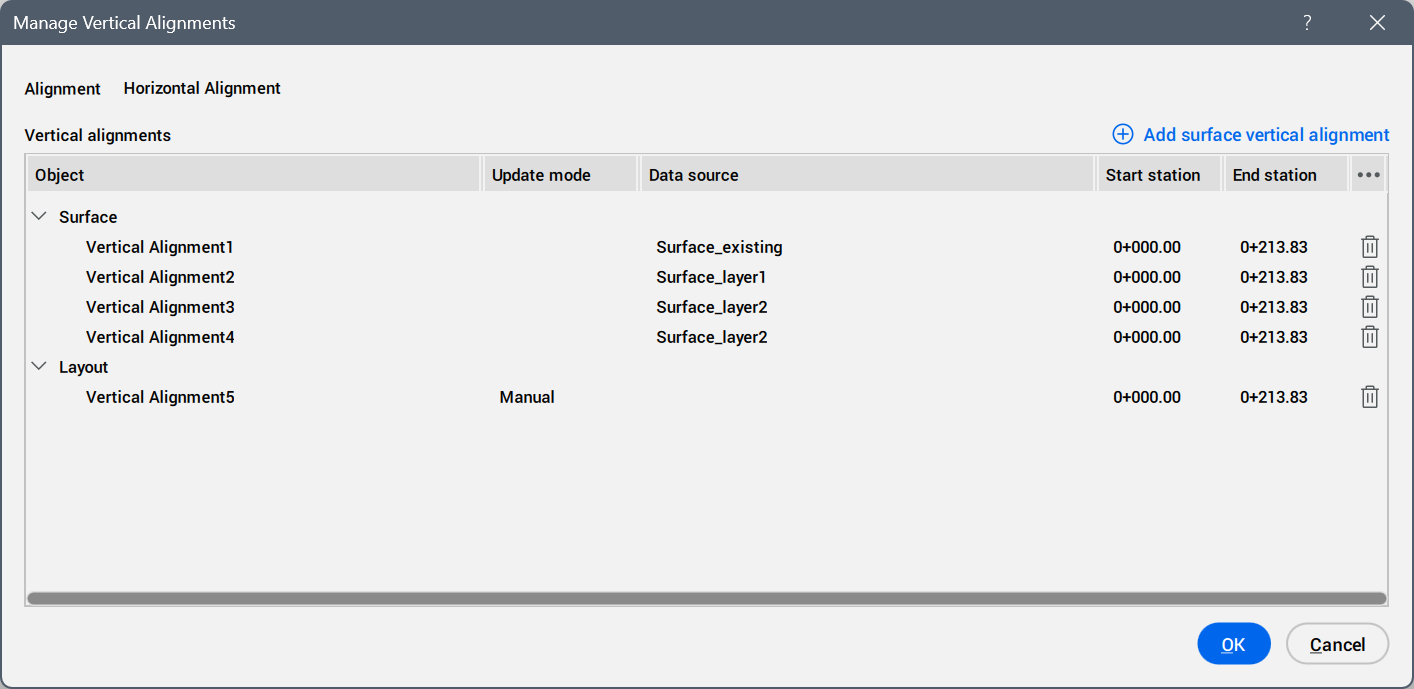
- Alignment
- Displays the horizontal alignment name.
- Add surface vertical alignment button
- Opens the Add Surface Vertical Alignment dialog box to add a surface for a vertical alignment.
- Vertical alignments
- Lists the vertical alignment objects created.
- Object
- Lists the vertical alignment objects grouped by source type (for example, Surface or Layout).
- Update mode
- Displays how the vertical alignment updates when its source changes.
- Data source
- Displays the source used to create the vertical alignment.
- Start station
- Displays the start station of the vertical alignment.
- End station
- Displays the end station of the vertical alignment.
- Actions
- Allows you to delete a vertical alignment from the list.