
Polecenie WIDOKPRZEKROJUEDYCJA
Edytuje widoki przekrojów obiektów civil.

Ikona: 
Metoda
Wybierz widok przekroju lub naciśnij klawisz Enter.
- Po wybraniu widoku przekroju można wybrać w wierszu poleceń edycję pojedynczego widoku przekroju lub wielu widoków przekroju.
- Po naciśnięciu klawisza Enter zostanie otwarte okno dialogowe Wybierz grupę linii przekroju, w którym można wybrać grupę linii przekroju.
Następnie otworzy się okno dialogowe Edytuj widoki przekrojów dla wielu widoków przekrojów, a okno dialogowe Edytuj widok przekroju dla pojedynczego widoku przekroju.
The Edit Section Views dialog box allows you to edit section views.
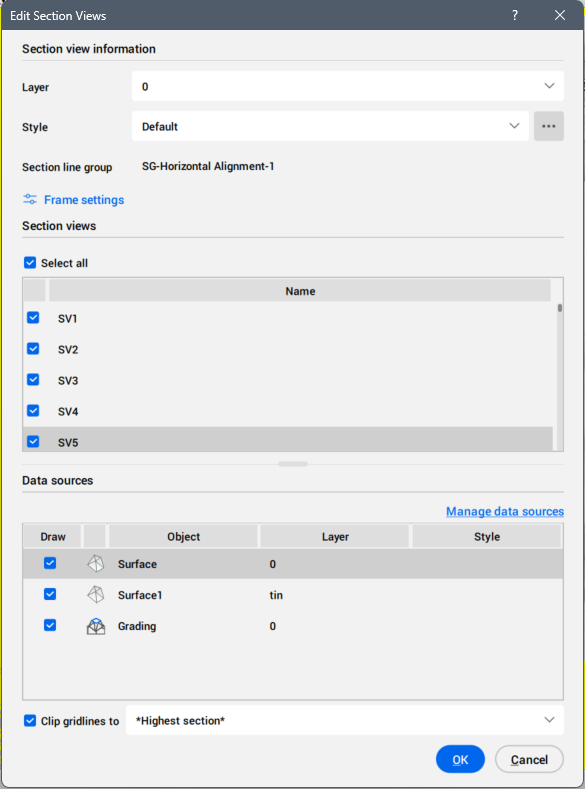
Informacje o widoku przekroju
Umożliwia ustawienie warstwy i stylu widoków przekroju.
- WArstwa
- Ustawia warstwę dla widoku przekroju, wybierając ją z listy rozwijanej.
- Styl
- Ustawia styl widoków przekroju poprzez wybranie go z listy rozwijanej.
Aby otworzyć, naciśnij przycisk z trzema kropkami po prawej stronie.Wybierz styl okno dialogowe, w którym można edytować lub kopiować styl widoku przekroju.
Grupa linii przekroju
Wyświetla nazwę grupy linii przekroju.
Ustawienia ramki
Otwiera okno dialogowe Ustawienia ramki w celu ustawienia szerokości i wysokości ramek.
Section view(s)
Lists the selected section view or all section views created along the section line group.
- Select all
- Selects all section views.
Źródła danych
Wyświetla wybrane źródła danych dla bieżącej grupy wierszy sekcji.
Możesz odznaczyć źródła danych, które chcesz usunąć z widoków przekroju.
Ponadto w przypadku niektórych źródeł danych można zmienić styl.
- Przycisk zarządzania źródłami danych
- Otwiera okno dialogowe Zarządzaj źródłami danych.
Przytnij linie siatki do
Po zaznaczeniu tej opcji możesz ustawić linie siatki przycinania z listy rozwijanej.
Opcje w ramach polecenia
- Wiele widoków przekroju
- Otwiera okno dialogowe Edytuj widoki przekroju w celu wybrania wielu widoków przekroju z listy Widoki przekrojów.
- Widok pojedynczego przekroju
- Akceptuje wybrany widok przekroju i otwiera okno dialogowe Edytuj widok przekroju.
- naciśnij klawisz Enter, aby wybrać grupę linii przekroju z listy
- Otwiera okno dialogowe Wybierz grupę linii przekroju.