
Auto Zuordnungssatz bearbeiten Dialog
Wird geöffnet über: Panel Civil Explorer > Registerkarte Einstellungen > Bereich Civil Punkte > Feld Auto-Zuordnungssätze > Kontextmenü-Option Erstellen
Im Dialog Auto Zuordnungssatz bearbeiten können Sie Codes erstellen, um allen Punkten, die denselben Anfangsteil in ihrem Punkt-Rohbeschreibungsattribut haben, automatisch Punktstile, Punktbeschriftungsstile, vollständige Beschreibungen, Layer, Skalierung und Drehung zuzuweisen sowie Linien (Leitlinien) zwischen den Punkten zu erstellen.
The Civil point raw description attribute specifies the automatic mapping code used to create the point in the drawing. When the auto mapping code matches a point raw description attribute, the properties defined for that code are applied to the point as it is added to the drawing.
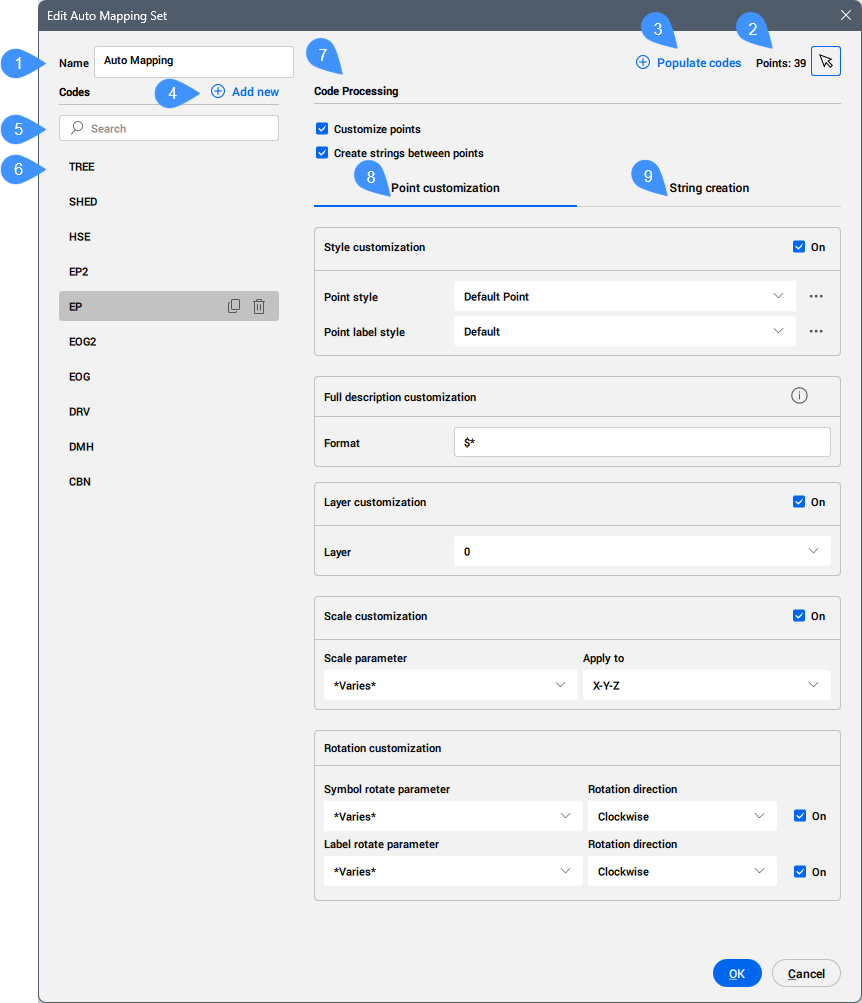
- Name
- Schaltfläche Punkte wählen
- Codes ausfüllen
- Neu hinzufügen
- Suchzeile
- Liste der Codes
- Codeverarbeitung
- Punktanpassung
- Leitlinienerstellung
Name
Ermöglicht Ihnen, einen Namen für den Auto-Zuordnungssatz festzulegen.
Schaltfläche Punkte wählen
Ermöglicht Ihnen, einen oder mehrere Punkte aus dem Zeichenbereich auszuwählen.
Codes ausfüllen
Fügt die für die ausgewählten Punkte gefundenen Codes der Codeliste hinzu.
Neu hinzufügen
Ermöglicht Ihnen, manuell einen neuen Code hinzuzufügen.
Click the default NewCode name created to rename it so that it matches the leading element of the point raw description attribute of the Civil point.
Weitere Informationen finden Sie im Artikel Civil-Punkte erstellen Dialog.
Wenn das Rohbeschreibungsattribut des Punkts beispielsweise TR 30 15 Fir ist, muss der Codename TR sein.
When the code name matches the leading element of the point raw description attribute of existing Civil points, the mapping is completed automatically when launching the APPLYAUTOMAPPING command.
Das bedeutet, dass alle Punkte in der Zeichnung, deren Punktbeschreibungsattribut mit dem ausgewählten Code beginnt (z. B. TR), automatisch den entsprechenden Punktstil, Punktbeschriftungsstil und andere Anzeigeeinstellungen erhalten.
Suchzeile
Ermöglicht Ihnen, die Codeliste nach einem bestimmten Code zu durchsuchen.
Liste der Codes
Lists all the codes created or imported from the selected Civil points.
Der ausgewählte Code kann dupliziert oder gelöscht werden.
Codeverarbeitung
- Punkte anpassen
- When turned on, allows you to customize the properties of the Civil point for a specified code.
- Leitlinien zwischen Punkten erstellen
- When turned on, allows you to create strings between Civil points.
Punktanpassung
- Stil anpassen
- Allows you to define how points with a specific code (for example, the leading part of the point raw description attribute of the Civil point) are displayed in the drawing.
- Punktstil
- Ermöglicht Ihnen, einen Punktstil aus der Dropdown-Liste auszuwählen. Klicken Sie auf die Schaltfläche Stil wählen (
 )
)
- Punktbeschriftungsstil
- Ermöglicht Ihnen, einen Punktbeschriftungsstil aus der Dropdown-Liste auszuwählen. Klicken Sie auf die Schaltfläche Stil wählen (), um den Dialog Stil wählen zu öffnen und einen Punktstil zu bearbeiten oder zu kopieren.
- Vollständige Beschreibung der Anpassung
- Allows you to define rules for creating the point full description attribute of the Civil point based on its point raw description attribute.
Bewegen Sie den Mauszeiger über das Ausrufezeichen auf der rechten Seite, um alle verfügbaren Optionen anzuzeigen.
Here is an example of the available formats for a Civil point with the point raw description attribute defined as TR 30 15 Fir:
Format Punkt ausführliche Beschreibung $* TR 30 15 Fir $t TR $1 30 $2 15 $3 Fir $2" $3 Tree with $1' Drip 15" Fir Tree with 30' Drip 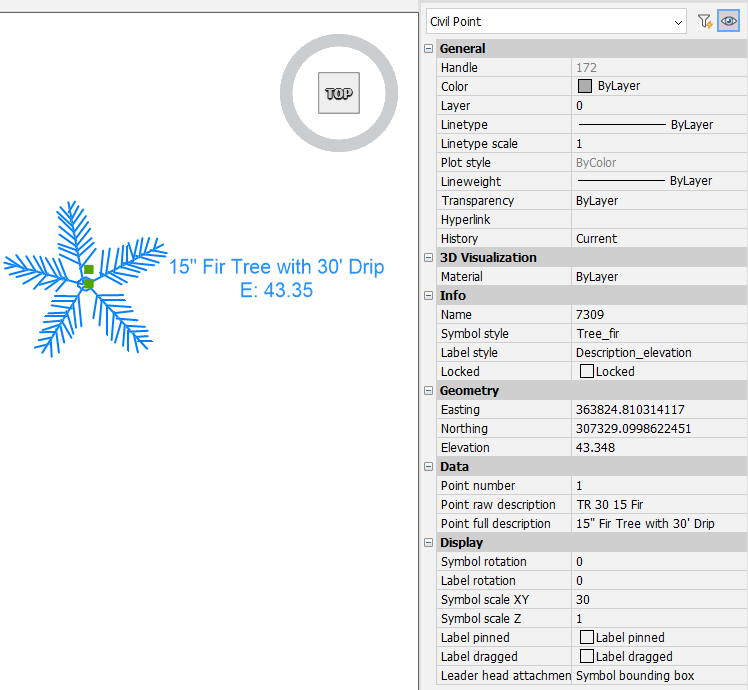
- Layer-Anpassung
- Defines the layer where to place all Civil points with the same code name. You can create a new layer by typing its name.
- Skalierungs-Anpassung
- Allows you to automatically scale the Civil point symbol based on a chosen parameter value of the point raw description attribute of the Civil point.
- Skalierungs-Parameter
- Allows you to choose a parameter of the point raw description attribute of the Civil point from the drop-down list.
- Anwenden auf
- Ermöglicht Ihnen die Auswahl der Skalierungsart für das Symbol: X-Y-Z, X-Y oder Z.
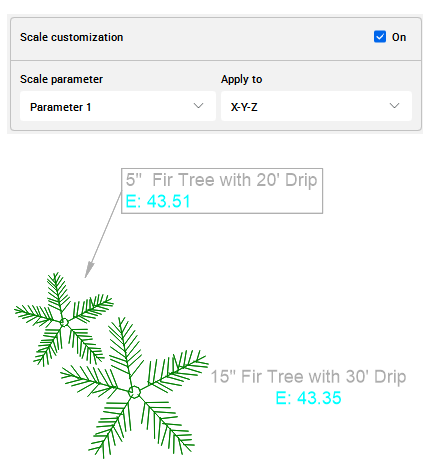
Here is an example of how the Parameter 1 of the point raw description attribute for two Civil points scales the Civil point symbols in the drawing.
The first Civil point with the point raw description defined as TR 30 15 Fir has the symbol scaled by 30, and the second with the point raw description attribute defined as TR 20 5 Fir has the symbol scaled by 20.
- Rotationsanpassung
- Allows you to automatically rotate the Civil point symbol and label based on the value of selected parameter of the point raw description attribute of the Civil point.
- Symboldrehungs-Parameter
- Allows you to choose a symbol rotate parameter of the point raw description attribute of the Civil point from the drop-down list.
Leitlinienerstellung
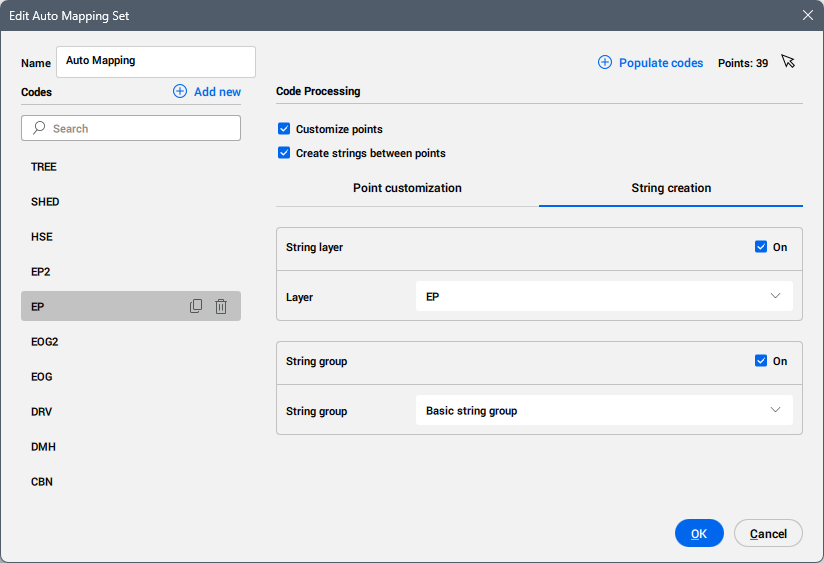
Allows you to define the auto mapping rules for strings created between Civil points.
- Leitlinien Layer
- Ermöglicht Ihnen, die Leitlinien mit demselben Codenamen auf dem ausgewählten Layer zu platzieren. Sie können einen neuen Layer erstellen, indem Sie dessen Namen eingeben.
- Leitlinien Gruppe
- Ermöglicht es Ihnen, die Leitlinien in der ausgewählten Leitlinie-Gruppe zu platzieren. Sie können eine neue Leitlinie-Gruppe erstellen, indem Sie ihren Namen eingeben.