
APPLYAUTOMAPPING Befehl
Aktualisiert bestehende Civil-Punkte, um die aktiven Auto-Zuordnung-Definitionen widerzuspiegeln.

Symbol: 
Beschreibung
Aktualisiert bestehende Civil-Punkte und die Linien dazwischen, um die aktiven Definitionen für Automatische Zuordnung widerzuspiegeln, ohne sie zu löschen oder erneut zu importieren.
Methode
Der Befehl öffnet den Dialog Automatische Zuordnung anwenden.
Anmerkung: Die Codes für die automatische Zuordnung im Dialog Auto-Zuordnungssatz bearbeiten und im Dialog Befehlscodesätze für die automatische Zuordnung bearbeiten generiert.
The Apply Auto Mapping dialog box configures the settings for automatically customizing points and creating strings based on point raw description and the auto mapping set.
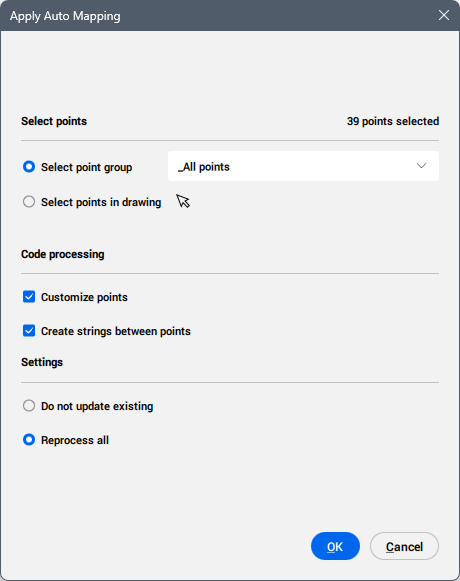
Select points
Allows you to select one or more points to apply auto mapping to.
- Select point group
- Selects a point group from the drop-down list. The _All points group is selected by default.
- Select points in drawing
- Creates a point selection set. Click the Select points (
 ) button.
Code processing
Allows you configure the code processing.
- Customize points
- When selected, customizes the civil points.
- Create strings between points
- When selected, creates strings between points.
Settings
Defines the civil points to be processed.
- Do not update existing
- Does not update the existing entities.
- Reprocess all
- Updates all the existing entities.