
CIVIL3DIMPORT command
Creates BricsCAD civil entities from an Autodesk® Civil 3D drawing.

Description
Opens the Import Civil 3D dialog box which allows you to import AutoCAD® Civil 3D objects from a selected DWG file, or to convert them directly from the current drawing.
The following objects from AutoCAD® Civil 3D can be imported and created in BricsCAD as Civil objects:
- Cogo points and point groups.
- TIN Surfaces.
- TIN Volume Surfaces.
- Grid Surfaces.
- Alignments (both Alignments by PI and Alignments by Elements are supported).
- Profile Views.
- Profiles (Vertical Alignments).Note: Property Sets data for entities in Civil 3D drawings are displayed in the BricsCAD Properties panel. The values of manually defined properties can be edited.
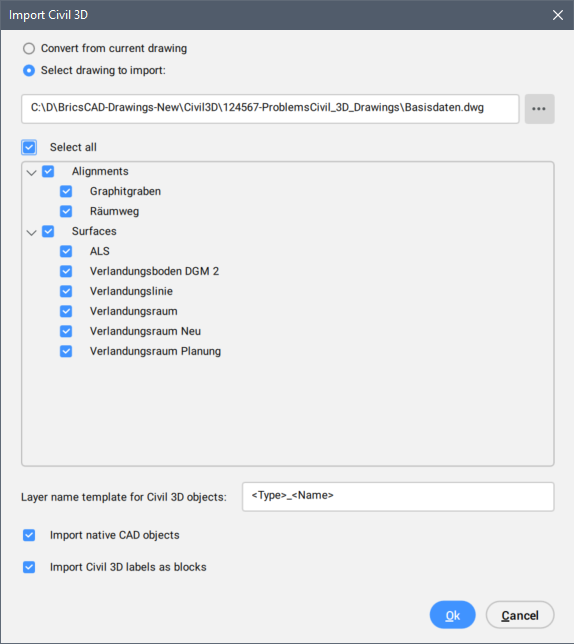
Convert from current drawing
Converts AutoCAD® Civil 3D objects in the current drawing.
Select drawing to import
Sets the drawing path or click the Select drawing button ( ) to select the drawing manually.
Select All
Selects all AutoCAD® Civil 3D objects in the drawing.
Layer name template for Civil 3D objects
Specifies the layer name template for imported AutoCAD® Civil 3D objects.
The following settings are available for defining the Layer name template:
- <Type>: includes AutoCAD® Civil 3D object type in the Layer name.
- <Name>: includes AutoCAD® Civil 3D object name in the Layer name.
- <SourceLayer>: Civil objects are created on same layer as source AutoCAD® Civil 3D objects.
To draw BricsCAD Civil objects on layers, use a Layer name that includes three elements: the source Civil 3D object type, the object name and the source AutoCAD® Civil 3D Layer name, as in the example below:
<Type>_<Name>_<SourceLayer>Import native CAD objects
Imports native CAD objects from the drawing, along with AutoCAD® Civil 3D objects.
Import Civil 3D labels as blocks
Imports AutoCAD® Civil 3D labels from the drawing as blocks.