
Elevation Analysis dialog box
Opens via:
- for selected TIN or TIN Volume surface entities > Civil Explorer panel > Visual Styles tab > the TIN Analysis section > Elevation analysis field > click the right side three dots
- for selected TIN or TIN Volume surface entities > Properties panel > TIN Analysis section > Elevations field > drop-down list > Edit... option
The Elevation Analysis dialog box allows you to define the parameters for creating the TIN surface Elevations Analysis.
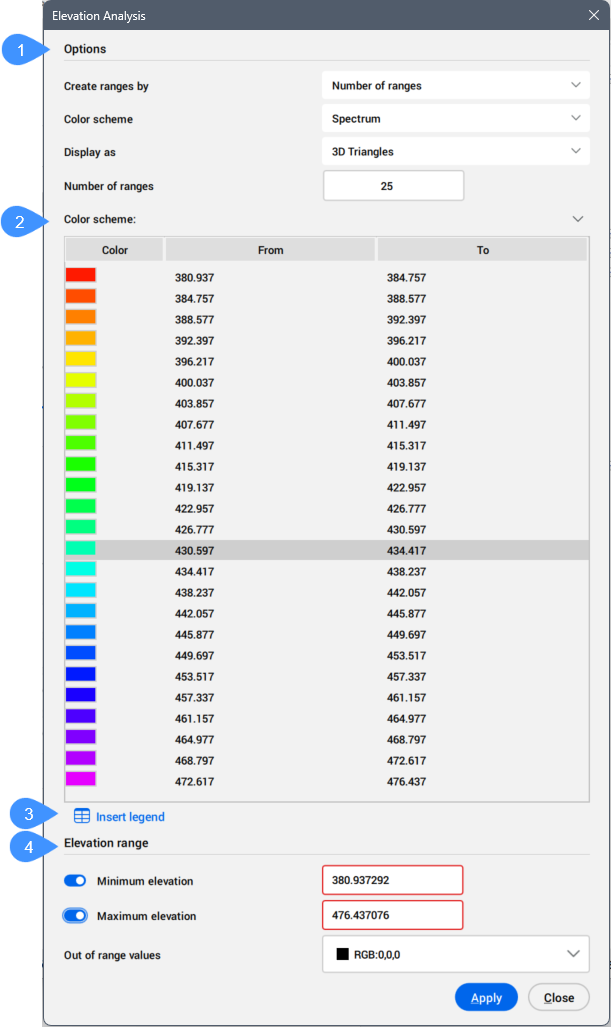
- Options
- Color scheme
- Insert legend
- Elevation range
Options
Allows you to specify the parameters for creating the TIN surface Elevations Analysis.
- Create ranges by
- Allows you to choose between the methods of creating Elevation Analysis:
- Number of ranges: applies color to the TIN surface using a specified number of elevation ranges, each displayed with its assigned color.
- Range interval: applies color to elevation ranges according to the specified base elevation and range interval. By default, the base elevation is set to the lowest point of the TIN surface, but you can specify a different base elevation value.
- Range interval with datum: applies color to elevation ranges according to the specified base elevation and datum. You can choose a separate color scheme for elevation ranges above and below the datum.
Important: Depending on how you create the ranges, different properties are available.
- Color scheme
- Allows you to select the color scheme for the Elevation Analysis.
Choose between the available options:
- Spectrum
- Earth
- Hydro
- Gray
- Reds
- Greens
- Blues
- Custom
- Above datum color scheme
- Allows you to select the above datum color scheme.
- Below datum color scheme
- Allows you to select the below datum color scheme.
- Display as
- Select the TIN Surface elements used to create the Elevation Analysis.
Choose between the available options:
- 3D Triangles
- 3D Contours
- Points
- 2D Triangles
- 2D Contours
Note: Turn off the display of triangles on the TIN surface to improve the visibility of the elevation analysis.
- Datum
- Specifies the datum elevation.
- Base elevation
- Specifies the starting elevation used to color the TIN surface by intervals. The elevation ranges are calculated by adding the range interval value to the base elevation.
- Number of ranges
- Specifies the number of elevation ranges used to apply colors to the TIN surface. You can modify the elevation ranges and colors of individual bands in the Color Scheme section.
- Range interval
- Specifies the Range interval for the Elevation Analysis.
Color scheme
Displays the corresponding colors for elevation ranges based on the selected color scheme.
Note: When you create a range using the Number of ranges option, you can edit the elevation values in the table.
Insert legend
Inserts the color scheme table at a specified location in the drawing.
Elevation range
Defines the minimum and maximum elevations between which colors are applied to the TIN surface according to the specified elevation ranges and colors. Values below the minimum and above the maximum elevation are colored using the color selected in the Out of range values section.
- Minimum elevation
- When activated, you can specify a minimum elevation value. Elevations on the TIN surface below this value are displayed using a different color, as defined in the Out of range values section.
- Maximum elevation
- When activated, you can specify a maximum elevation value. Elevations on the TIN surface above this value are displayed using a different color, as defined in the Out of range values section.
- Out of range values
- Allows you to define the color representation for elevations that have values outside the defined range.