
GESTIONARALINEARVISTA comando
Administra las alineaciones verticales.

Ícono: 
Método
Se abre el cuadro de diálogo Seleccionar Alineación para seleccionar una alineación horizontal.
Nota: Cuando ya hay una alineación horizontal seleccionada en el dibujo, no se abre el cuadro de diálogo Seleccionar alineación.
Luego, se abre el cuadro de diálogo Administrar Alineaciones Verticales.
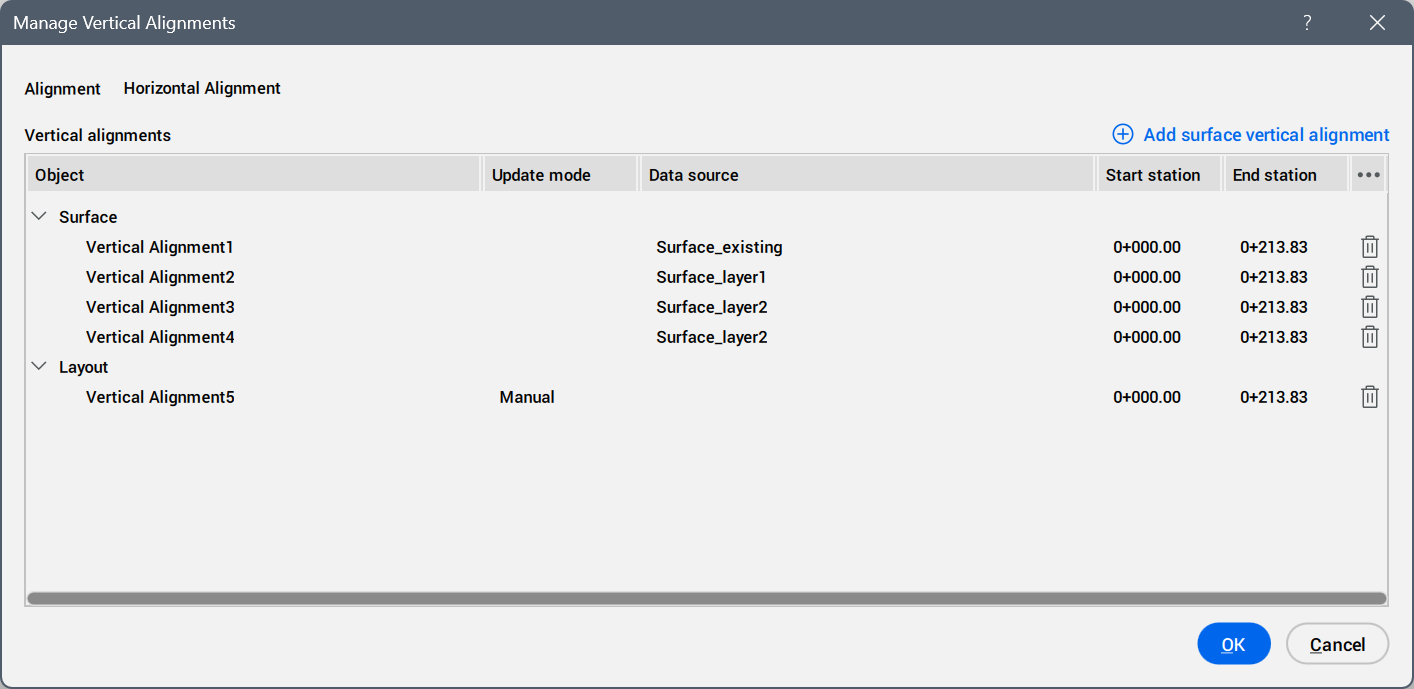
- Alignment
- Displays the horizontal alignment name.
- Add surface vertical alignment button
- Opens the Add Surface Vertical Alignment dialog box to add a surface for a vertical alignment.
- Vertical alignments
- Lists the vertical alignment objects created.
- Object
- Lists the vertical alignment objects grouped by source type (for example, Surface or Layout).
- Update mode
- Displays how the vertical alignment updates when its source changes.
- Data source
- Displays the source used to create the vertical alignment.
- Start station
- Displays the start station of the vertical alignment.
- End station
- Displays the end station of the vertical alignment.
- Actions
- Allows you to delete a vertical alignment from the list.