
断面ビューの編集ダイアログボックス
開く方法:SECTIONVIEWEDIT コマンド
断面ビューの編集 ダイアログボックスでは、断面ビューを編集することができます。
注: 1 つの断面ビューのみを選択した場合、ダイアログボックスの名前は断面ビューを編集。
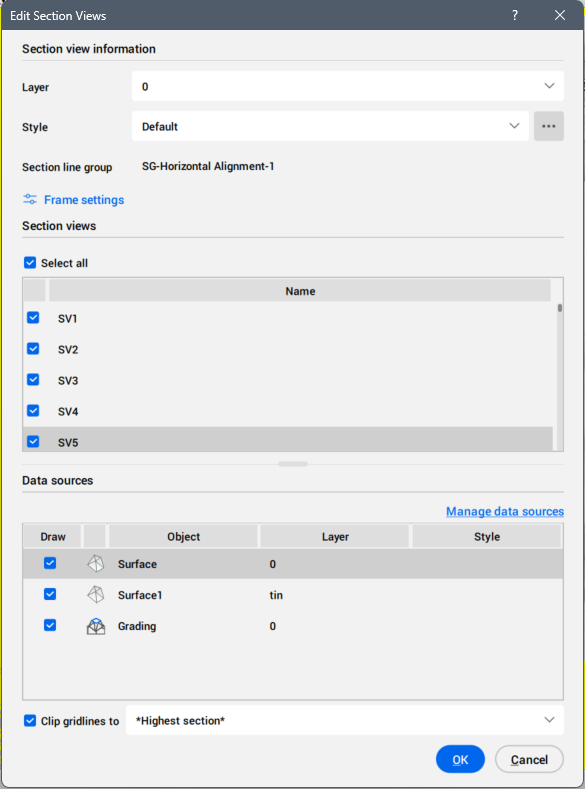
横断ビュー情報
横断ビューの画層とスタイルを設定します。
- 画層
- ドロップダウンリストから選択して、横断ビューの画層を設定します。
- スタイル
- ドロップダウンリストから選択して、横断ビューのスタイルを設定します。
右側の参照ボタンをクリックすると、スタイルを選択ダイアログボックスが開き、横断ビューのスタイルの編集やコピーができます。
横断線グループ
横断線グループ名を表示します。
フレーム設定
フレーム設定ダイアログボックスが開き、フレームの幅と高さを設定します。
断面ビュー
選択した断面ビュー、または断面線グループに沿って作成されたすべての断面図を一覧表示します。
- すべて選択
- すべての断面ビューを選択します。
データソース
現在の横断線グループに選択されているデータソースを一覧表示します。
データソースの選択を解除して、横断ビューから削除することができます。
また、データソースによってスタイルを変更することもできます。
- データソース管理ボタン
- データソース管理ダイアログボックスが開きます。
グリッド線をクリップ
オンにすると、ドロップダウンリストからクリップグリッド線を設定することができます。