
HEALTHADVISORROUTINE command
Sets the tasks included in the Health Advisor routine that automatically runs in the background when a drawing file opens to check the drawing and improve performance.

Description
The HEALTHADVISORROUTINE command opens the Health Advisor Settings dialog box:
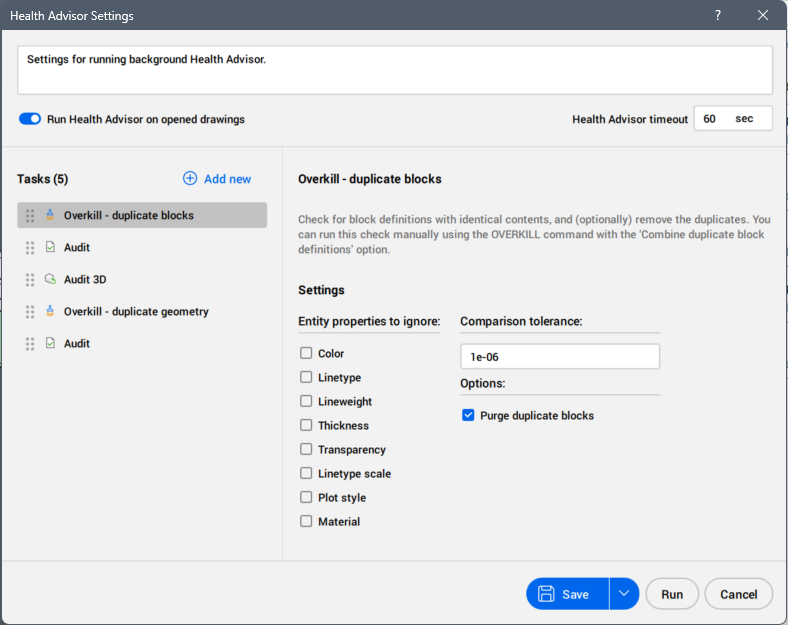
Routine description
Displays the description of the Health Advisor routine.
Run Health Advisor on opened drawings
Determines whether the Health Advisor routine starts automatically running in the background when opening a drawing. This setting is also controlled with the HEALTHADVISOR system variable.
Health Advisor timeout
Allows you to set the maximum time, in seconds, for the Health Advisor routine to complete. The process is automatically terminated if it exceeds this duration. This setting is also controlled with the HEALTHADVISORTIMEOUT system variable.
Tasks
Lists the tasks selected for the Health Advisor routine to be performed background during the opening of a drawing file.
- Drawings that have not been modified since the last check are not rescanned at opening.
- Tasks can be reordered in the routine using drag and drop method.
- On the right side of the selected task, you can access its settings.
Add new
Adds new tasks to the Health Advisor routine from the drop-down list.
- Not all tasks are available to be added in Health Advisor routine.
- A task can be added multiple times at different steps of the routine.
Save
Saves the Health Advisor routine.