
TABLECONSULTBLOC (commande)
Ouvre une boîte de dialogue de recherche de paramètres.

Icône : 
Avertissement de non-responsabilité

La création et l'édition de définitions de blocs dynamiques sous MODIFBLOC en Mode expérimental est une fonctionnalité expérimentale qui n'est pas encore stable et qui pourrait être supprimée à l'avenir.
Utilisez la commande GERERFONCTIONSEXPERIMENTALES (ou la variable système EXPERIMENTALMODE) pour activer ou désactiver les fonctions expérimentales, puis redémarrez BricsCAD.
Le Mode expérimental est désactivé par défaut.
Description
Affiche ou crée un tableau de consultation pour une action de consultation dans une définition de bloc dynamique.
Méthode
Dans l'Éditeur de blocs, double-cliquez sur une entité d'action de recherche ou lancez la commande et sélectionnez une action de recherche. La boîte de dialogue Tableau de consultation des propriétés s'ouvre.
La boîte de dialogue Tableau de consultation des propriétés permet de modifier les propriétés de l'action de consultation sélectionnée.
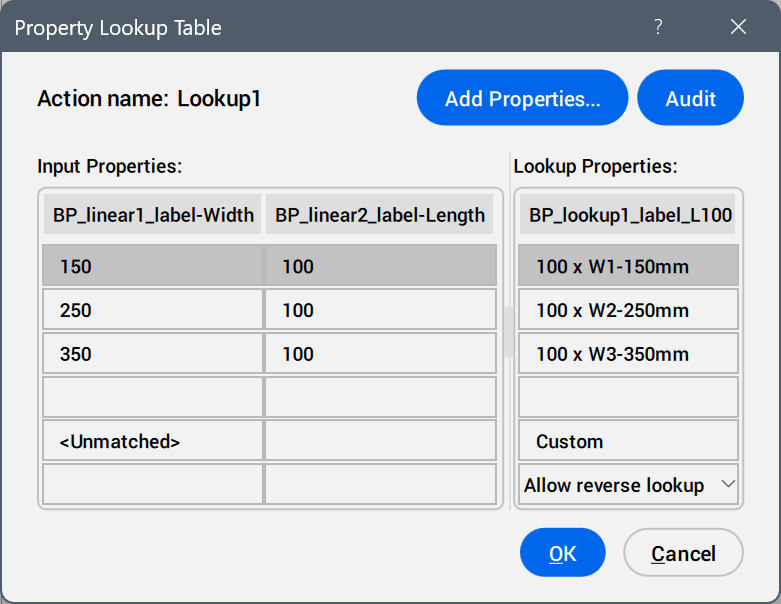
- Ajouter des propriétés...
- Ouvre la boîte de dialogue Ajouter les propriétés des paramètres pour afficher les paramètres disponibles.
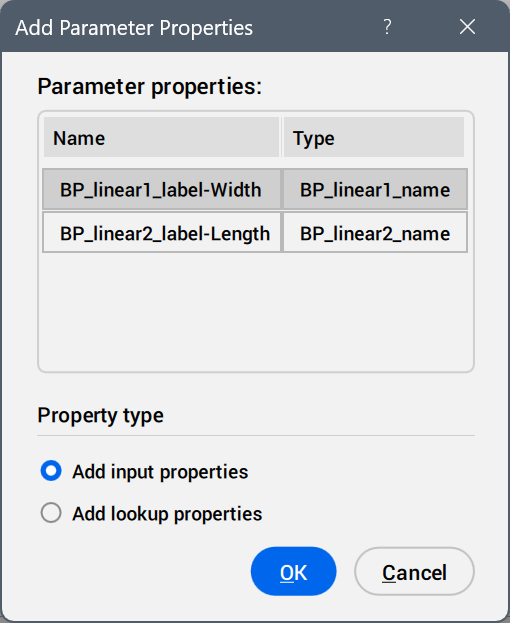
Sélectionnez les paramètres à ajouter en tant que colonnes de propriétés.
- Contrôle
- Recherche d'erreurs dans le Tableau de consultation des propriétés.
- Propriétés de saisie
- Modifie les valeurs des paramètres ajoutés.
- Propriétés de consultation
- Ajoute des noms aux options du tableau de consultation.
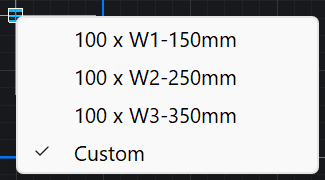
- Personnalisé
- S'affiche en tant qu'option du tableau de consultation lorsqu'une valeur est insérée manuellement dans le panneau Propriétés pour un paramètre utilisé dans le tableau de consultation.
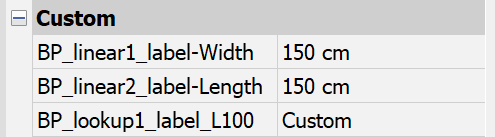
- Liste déroulante de consultation inversée
-
- En lecture seule
- Désactive la consultation inversée.
- Cliquez avec le bouton droit de la souris sur un en-tête de colonne pour afficher les options du menu contextuel.
-
- Trier
- Trie les rangées du tableau en fonction des valeurs de la colonne sélectionnée, par ordre croissant ou décroissant.
- Supprimer une colonne de propriétés
- Supprime la colonne de paramètres sélectionnée.
- Effacer le contenu
- Supprime le contenu des cellules de la colonne sélectionnée.
- Cliquez avec le bouton droit de la souris sur une cellule pour afficher les options du menu contextuel.
-
- Insérer une rangée
- Insère une ligne au-dessus de la ligne sélectionnée.
- Supprimer une rangée
- Supprime la ligne sélectionnée.
- Effacer le contenu
- Supprime le contenu de la ligne sélectionnée.
- Déplacer vers le haut
- Déplace la ligne d'une position vers le haut.
- Déplacer vers le bas
- Déplace la ligne d'une position vers le bas.