
BLOOKUPTABLE コマンド
検索パラメータダイアログボックスを開きます。

アイコン:
免責事項

試験モードにおけるBEDITによるダイナミックブロック定義の作成および編集は、まだ安定していない試験的な機能であり、将来的に削除される可能性があります。
MANAGEEXPERIMENTALFEATURESコマンド(またはEXPERIMENTALMODEシステム変数)を使用して、試験的な機能をオンまたはオフにしてからBricsCADを再起動します。
試験モードは、デフォルトでオフになっています。
重要: BricsCADを米国で購入した場合、または米国で使用する場合、この機能はご利用いただけず、ライセンスも付与されません。詳細は、EULAを参照してください。
説明
ダイナミックブロック定義内のルックアップアクションのルックアップテーブルを、表示または作成します。
使用方法
ブロックエディタで、ルックアップアクションエンティティをダブルクリックするか、コマンドを実行してルックアップアクションを選択します。「プロパティ参照テーブル」ダイアログボックスが開きます。
プロパティ検索テーブルダイアログボックスは、選択した検索アクションのプロパティを編集します。
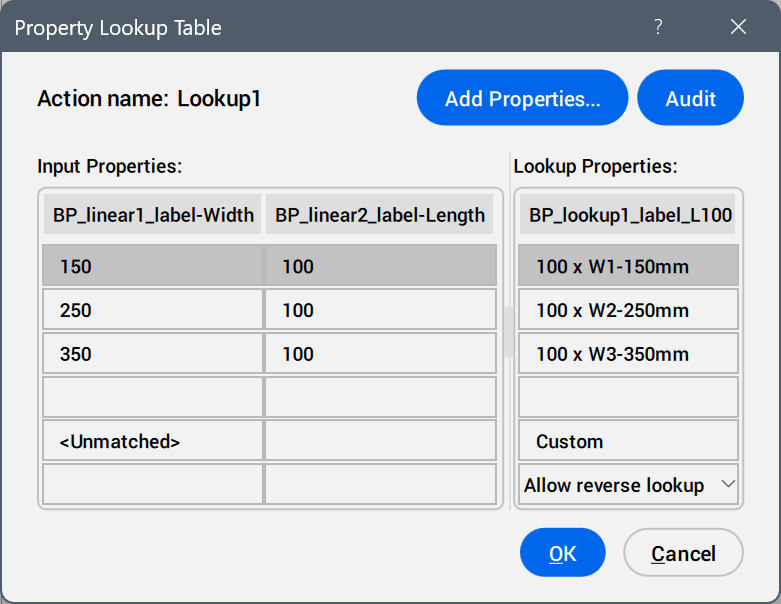
- プロパティを追加...
- パラメータプロパティを追加ダイアログボックスを開き、利用可能なパラメータを表示します。
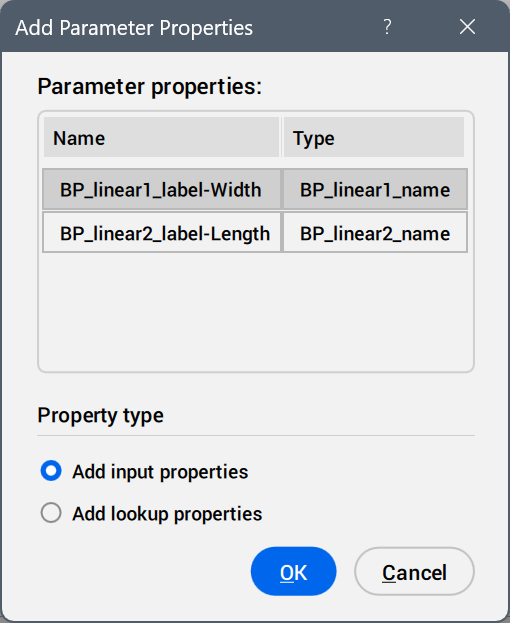
プロパティ列として追加するパラメータを選択してください。
- 監査
- プロパティ検索テーブル内のエラーを検索します。
- プロパティを入力:
- 追加されたパラメータの値を編集します。
- ルックアッププロパティ:
- ルックアップテーブルのオプションに名前を追加します。
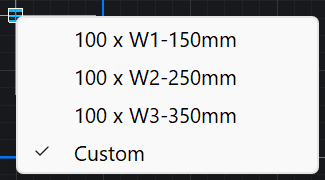
- カスタム
- ルックアップテーブルで使用されているパラメータについて、プロパティパネルで値を手動入力した場合、その値がルックアップテーブルオプションとして表示されます。
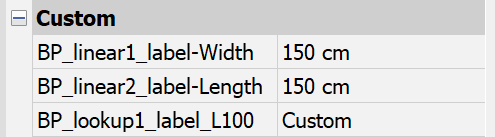
- 逆ルックアップドロップダウンリスト
-
- 読み取り専用
- 逆ルックアップを無効にします。
- 列ヘッダーを右クリックすると、コンテキストメニューオプションが表示されます。
-
- ソート
- 選択した列の値に基づいて、テーブル内の行を昇順または降順に並べ替えます。
- プロパティ列を削除
- 選択したパラメータ列を削除します。
- 内容をクリア
- 選択した列のセルの内容を削除します。
- セルを右クリックしてコンテキストメニューを表示します。
-
- 行を挿入
- 選択した行の上に新しい行を挿入します。
- 行を削除
- 選択した行を削除します。
- 内容をクリア
- 選択した行の内容を削除します。
- 上へ移動
- 行を1つ上の位置に移動します。
- 下へ移動
- 行を1つ下に移動します。