
Tabella Controllo Proprietà (finestra di dialogo)
Si apre tramite:
- AZIONEBLOC
- Comando STRUMAZIONEBLOC > opzione Controllo dinamico
- TABCONTRDINAMBLOC
Esclusione di responsabilità

La creazione e la modifica di definizioni di blocchi dinamici con MODIFBLOC in Modalità sperimentale è una funzione sperimentale che potrebbe non essere ancora stabile, e potrebbe essere rimossa in futuro.
Utilizzare il comando GESTISCIFUNZIONISPERIMENTALI (o la variabile di sistema EXPERIMENTALMODE) per attivare o disattivare le funzioni sperimentali, quindi riavviare BricsCAD.
La Modalità sperimentale è disattivata per impostazione predefinita.
Importante: Nel caso in cui l'utente acquisti BricsCAD negli Stati Uniti o per l'uso negli Stati Uniti, questa funzione non è né disponibile né concessa in licenza all'utente. Per ulteriori informazioni, consultare l'EULA.
La finestra di dialogo Tabella Controllo Dinamico Proprietà modifica le proprietà dell'azione di ricerca selezionata.
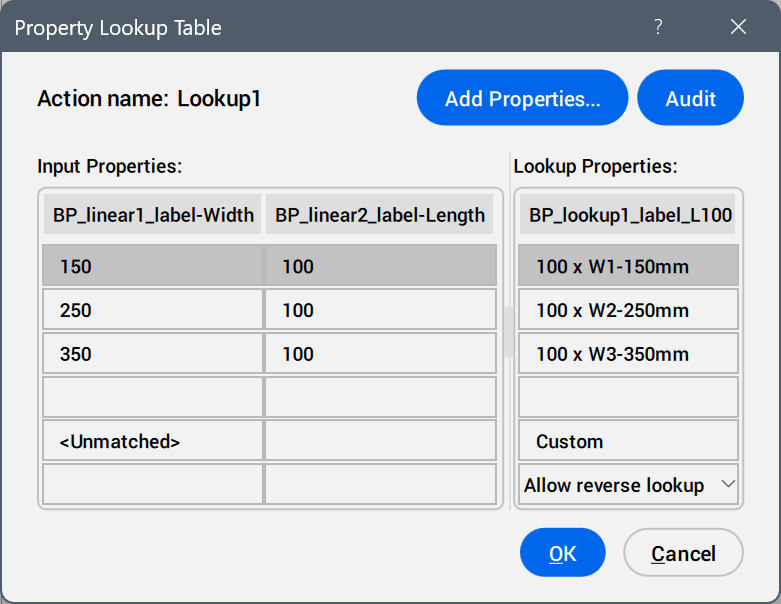
- Aggiungi Proprietà ...
- Apre la finestra di dialogo Aggiungi Proprietà Parametro per visualizzare i parametri disponibili.
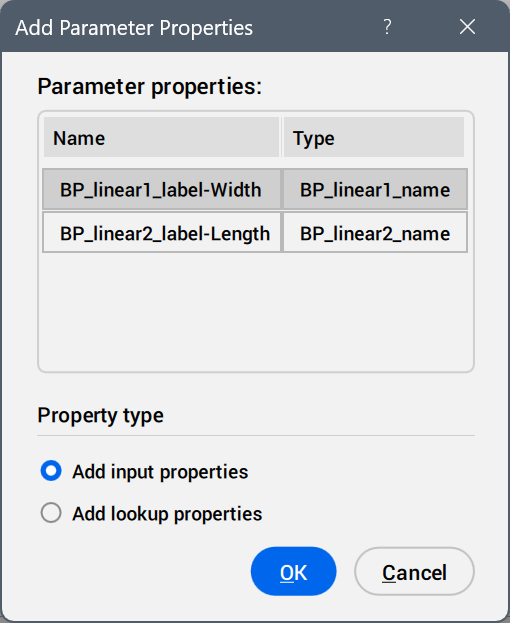
Selezionare i parametri da aggiungere come colonne di proprietà.
- Verifica
- Cerca errori nella Tabella Controllo Proprietà.
- Proprietà di Input
- Modifica i valori dei parametri aggiunti.
- Proprietà di Ricerca
- Aggiunge nomi alle opzioni della tabella di controllo.
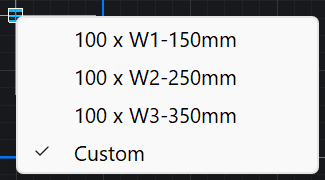
- Personalizzato
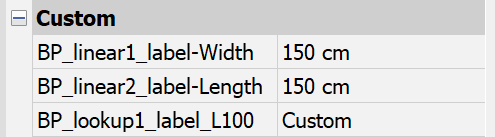
- Mostrato come opzione della tabella di controllo dinamico quando un valore viene inserito manualmente nel pannello Proprietà per un parametro utilizzato nella tabella di controllo dinamico.
- Elenco a discesa della ricerca inversa
-
- Sola lettura
- Disattiva la ricerca inversa.
- Cliccare con il tasto destro del mouse sull'intestazione di una colonna per visualizzare le opzioni del menu contestuale.
-
- Ordinamento
- Ordina le righe nella tabella in base ai valori nella colonna selezionata, ascendenti o decrescenti.
- Elimina colonna proprietà
- Elimina la colonna dei parametri selezionati.
- Ripulisci contenuti
- Rimuove il contenuto delle celle della colonna selezionata.
- Cliccare con il tasto destro su una cella per visualizzare le opzioni del menu contestuale.
-
- Inserisci riga
- Inserisce una riga sopra quella selezionata.
- Elimina Riga
- Elimina la riga selezionata.
- Ripulisci contenuti
- Rimuove il contenuto della riga selezionata.
- Sposta in Alto
- Sposta la riga verso l'alto di una posizione.
- Sposta in Basso
- Sposta la riga verso il basso di una posizione.