
BABRUFTAB Befehl
Öffnet einen Dialog zum Nachschlagen von Parametern.

Symbol: 
Haftungsausschluss

Das Erstellen und Bearbeiten von dynamischen Blockdefinitionen unter BBEARB im Experimentalmodus ist eine experimentelle Funktion, die möglicherweise noch nicht stabil ist und in Zukunft entfernt werden könnte.
Verwenden Sie den Befehl VERWALTENEXPERIMENTELLERFEATURES (oder die Systemvariable EXPERIMENTALMODE), um experimentelle Funktionen zu aktivieren oder zu deaktivieren, und starten Sie anschließend BricsCAD neu.
Der Experimenteller Modus ist standardmäßig deaktiviert.
Beschreibung
Zeigt eine Nachschlagetabelle für eine Nachschlageaktion in der Definition eines dynamischen Blocks an oder erstellt diese.
Methode
Doppelklicken Sie im Block-Editor auf ein Abrufaktion-Objekt oder führen Sie den Befehl aus und wählen Sie eine Abrufaktion aus. Der Dialog Eigenschafts Abruf Tabelle wird geöffnet.
Im Dialog Eigenschaften-Nachschlagetabelle können die Eigenschaften der ausgewählten Abrufsaktion bearbeitet werden.
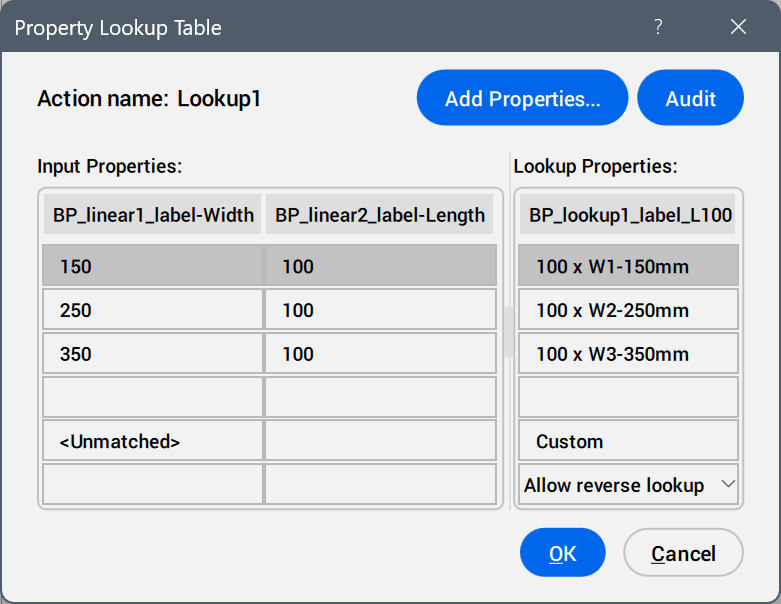
- Eigenschaften hinzufügen...
- Öffnet den Dialog Parametereigenschaften hinzufügen, um die verfügbaren Parameter anzuzeigen.
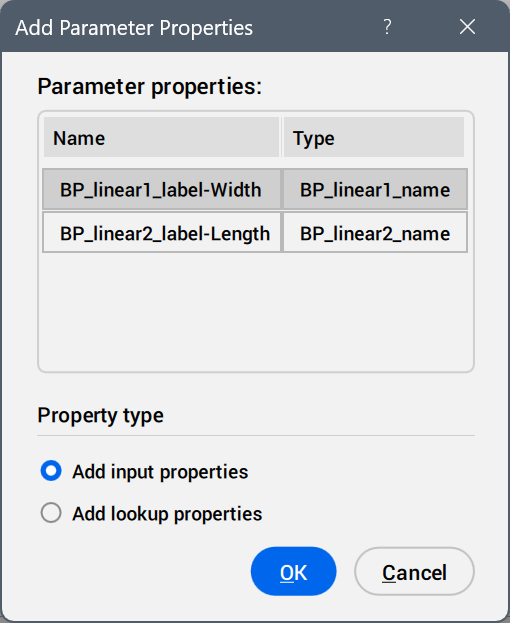
Wählen Sie die Parameter aus, die als Eigenschaftsspalten hinzugefügt werden sollen.
- Prüfung
- Sucht nach Fehlern in der Eigenschaften-Nachschlagetabelle.
- Eingabe-Eigenschaften
- Ändert die Werte der hinzugefügten Parameter.
- Nachschlage-Eigenschaften
- Fügt Namen zu den Optionen der Nachschlagetabelle hinzu.
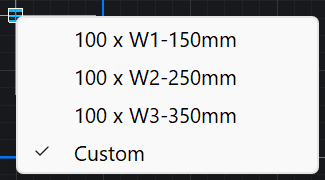
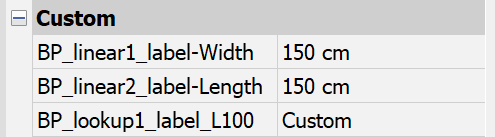
- Benutzerdefiniert
- Wird als Option in der Nachschlagetabelle angezeigt, wenn im Panel Eigenschaften für einen in der Nachschlagetabelle verwendeten Parameter manuell ein Wert eingegeben wird.
- Dropdown-Liste für Rückwärtssuche
-
- Nur lesen
- Deaktiviert die Rückwärtssuche.
- Klicken Sie mit der rechten Maustaste auf eine Spaltenüberschrift, um die Optionen des Kontextmenüs anzuzeigen.
-
- Sortieren
- Sortiert die Zeilen in der Tabelle anhand der Werte in der ausgewählten Spalte, aufsteigend oder absteigend.
- Eigenschaftenspalte löschen
- Löscht die ausgewählte Parameterspalte.
- Inhalt leeren
- Entfernt den Zelleninhalt der ausgewählten Spalte.
- Klicken Sie mit der rechten Maustaste auf eine Zelle, um die Optionen des Kontextmenüs anzuzeigen.
-
- Zeile einfügen
- Fügt eine Zeile oberhalb der ausgewählten Zeile ein.
- Zeile löschen
- Löscht die ausgewählte Zeile.
- Inhalt leeren
- Entfernt den Inhalt der ausgewählten Zeile.
- Nach oben
- Verschiebt die Zeile um eine Position nach oben.
- Nach unten
- Verschiebt die Zeile um eine Position nach unten.