
BCYCLEORDER command
Adjusts the cycling order of grips for a dynamic block definition.

Disclaimer
Important: In the event that you purchase BricsCAD in the U.S. or for use in the U.S., the feature to create or edit dynamic block definitions is neither available nor licensed to you. Please see EULA for more information.
Description
Note: This command is available while the DBlock Editor is active. See the BEDIT command article.
Opens the Insertion Cycling Order dialog box to adjust the cycling order of grips used as insertion points for a dynamic block definition.
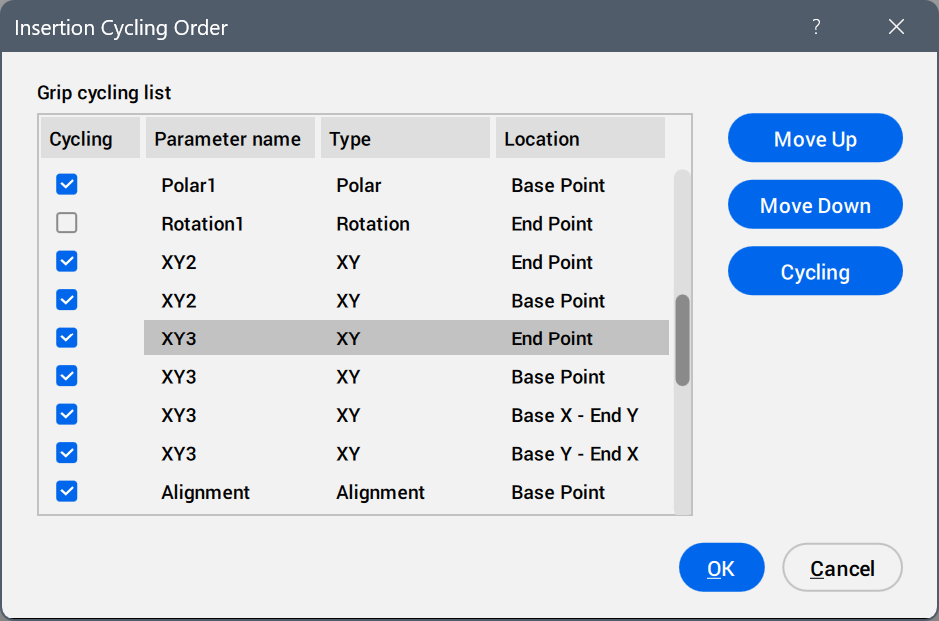
- Grip cycling list
- Displays all available parameter grips in the current cycling order.
- Move Up
- Moves the parameter grip up one position in the list.
- Move Down
- Moves the parameter grip down one position in the list.
- Cycling
- Selects or deselects the Cycling check box for the selected parameters to make these available or unavailable as insertion points.Note: You can use the Shift and Ctrl keys to create a multiple selection.
- OK
- Saves the changes.
- Cancel
- Discards the changes.