
Tabela Pesquisa de Propriedades caixa de diálogo
Abre via:
- ACAOB comando
- Comando FERRAMENTAACAOBLOCO > Pesquisa opção
- BLOOKUPTABLE comando
Aviso de responsabilidade

Criar e editar Bloco Dinâmico sob EDITARBLOCO em Modo experimental é um recurso experimental que pode não ser estável, ainda e pode ser removido no futuro.
Use o comando GERENCIARECURSOSEXPERIMENTAIS (ou a variável de sistema EXPERIMENTALMODE) para Ativar ou Desativar recursos experimentais, então reinicie BricsCAD.
O Modo experimental está Desativado por predefinição.
Importante: No caso de você comprar BricsCAD nos EUA ou para uso nos EUA, esse recurso não está disponível, e nem é licenciado para você. Consulte o EULA para obter mais informação.
A caixa de diálogo Tabela Pesquisa de Propriedades permite editar as propriedades da ação de pesquisa selecionada.
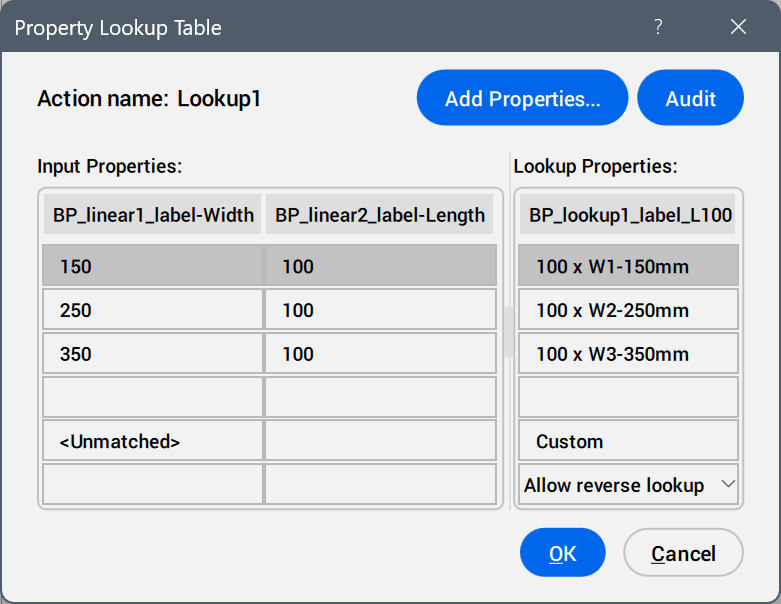
- Adic. Propriedades...
- Abre a caixa de diálogo Adic. Propriedade a Parâmetro para exibir parâmetros disponíveis.
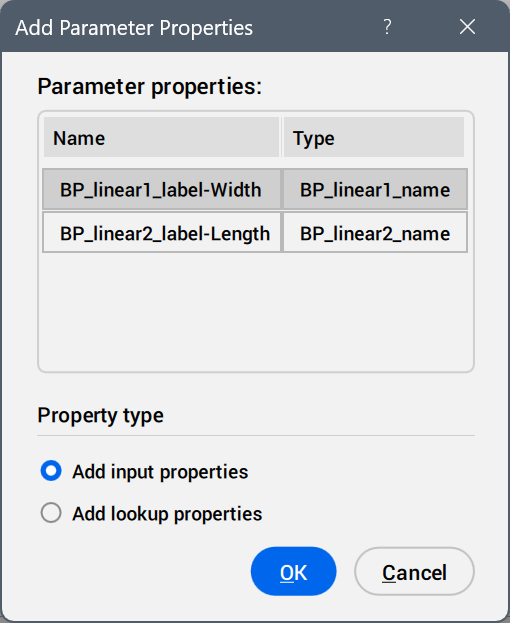
Selecione os parâmetros a ser adicionados como colunas de propriedades.
- Inspecionar
- Busca por erros na Tabela Pesquisa de Propriedades.
- Entrar Propriedades
- Edita os valores dos parâmetros adicionados.
- Pesquisar Propriedades
- Adiciona nomes às opções da tabela de pesquisa.
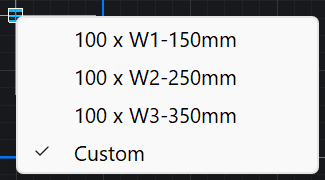
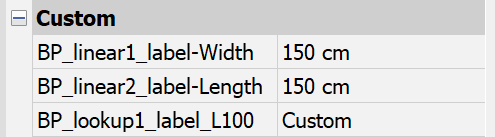
- perSonalizada
- Exibe como uma opção da tabela de pesquisa quando um valor é inserido manualmente no painel Propriedades para um parâmetro usado na tabela de pesquisa.
- Inverter lista suspensa de pesquisa
-
- Somente-leitura
- Desativa a pesquisa reversa.
- Clique o botão-direito no cabeçalho da coluna para exibir opções do menu de contexto.
-
- Ordenar
- Ordena as linhas da tabela com base nos valores da coluna selecionada, ascendente descendente.
- Excluir coluna de propriedade
- Exclui a coluna de parâmetros selecionada.
- Limpar conteúdo
- Remove o conteúdo da célula da coluna selecionada.
- Clique o botão-direito em uma célula para exibir opções do menu de contexto.
-
- Inserir linha
- Insere uma linha acima da selecionada.
- Excluir linha
- Exclui a linha selecionada.
- Limpar conteúdo
- Remove o conteúdo da linha selecionada.
- Move acima
- Move a linha uma posição para cima.
- Mover abaixo
- Move a linha uma posição para baixo.