
BSICHTBSTATUS Befehl
Verwaltet Sichtbarkeitszustände in einer Definition eines dynamischen Blocks.

Symbol: 
Haftungsausschluss

Das Erstellen und Bearbeiten von dynamischen Blockdefinitionen unter BBEARB im Experimentalmodus ist eine experimentelle Funktion, die möglicherweise noch nicht stabil ist und in Zukunft entfernt werden könnte.
Verwenden Sie den Befehl VERWALTENEXPERIMENTELLERFEATURES (oder die Systemvariable EXPERIMENTALMODE), um experimentelle Funktionen zu aktivieren oder zu deaktivieren, und starten Sie anschließend BricsCAD neu.
Der Experimenteller Modus ist standardmäßig deaktiviert.
Beschreibung
Öffnet den Dialog Sichtbarkeitsstatus, um die Sichtbarkeitsstatus in einer dynamischen Blockdefinition zu verwalten.
Im Dialog Sichtbarkeits Status können Sie den aktuellen Sichtbarkeitsstatus festlegen, neue Status erstellen und vorhandene Sichtbarkeitsstatus umbenennen oder löschen.
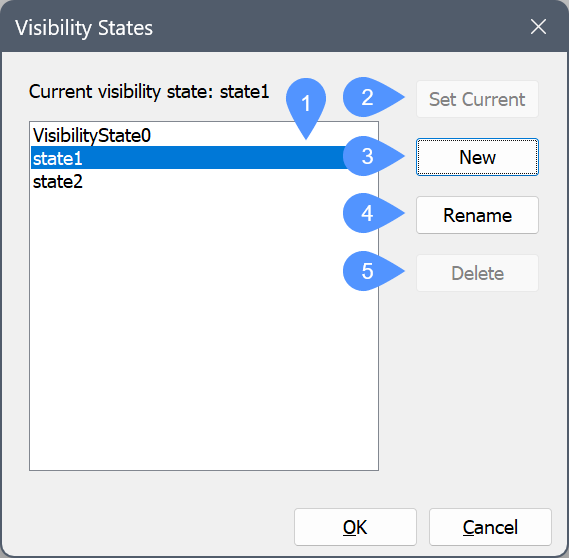
- Sichtbarkeits Status Liste
- Aktuell setzen
- Neu
- Umbenennen
- Löschen
- Sichtbarkeits Status Liste
- Zeigt die Liste der verfügbaren Sichtbarkeitsstatus an, die in der dynamischen Blockdefinition gespeichert sind.
- Aktuell setzen
- Setzt den ausgewählten Sichtbarkeitsstatus in der Liste als aktuell fest.
- Neu
- Öffnet den Neuen Sichtbarkeits Status, um einen neuen Sichtbarkeitsstatus zur dynamischen Blockdefinition hinzuzufügen.
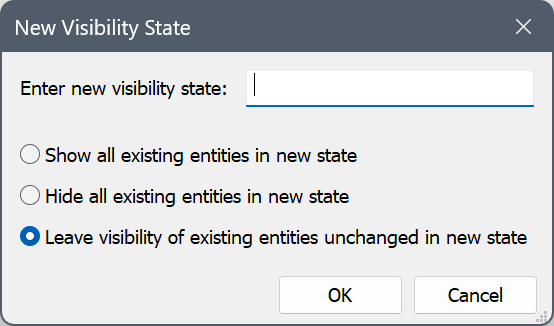
- Umbenennen
- Benennt den ausgewählten Sichtbarkeitsstatus um.
- Löschen
- Löscht den ausgewählten Sichtbarkeitsstatus aus der dynamischen Blockdefinition.